Authoring reference
This section is for a document author who has built a first Zensical site and wants to add structure or specialist content to its Markdown pages, use values calculated across the document, or produce a PDF. You do not need to read every page: choose the feature or tool the document needs and start with its smallest complete example.
Figure 19.1 starts with the document's need and groups the available features into three paths. Use the top path for structure and layout, the middle path for evidence and navigation, and the bottom path for calculated values or generated outputs.
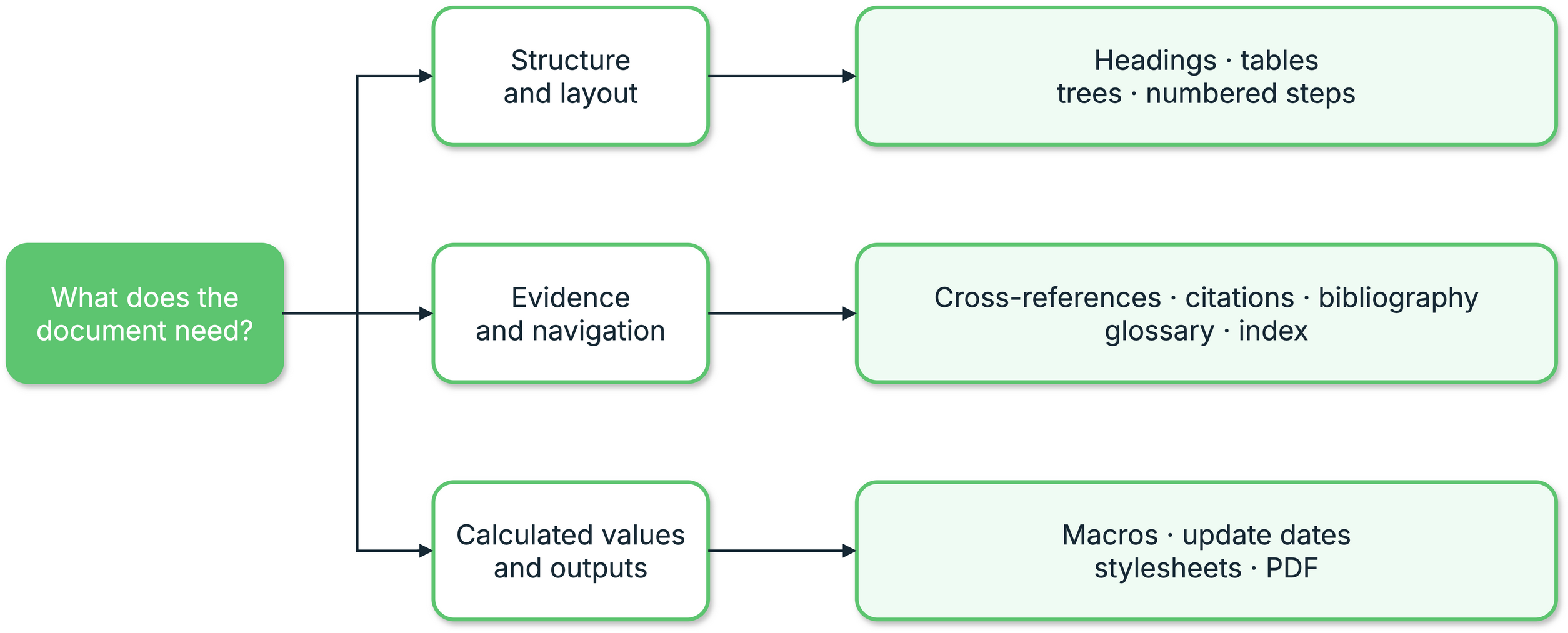
1. Prodockit authoring feature map
Build on PyMdown Blocks
Two prodockit extensions are built directly on PyMdown Blocks (see the
upstream Blocks guide):
prodockit.steps for procedures and prodockit.tree for directory listings.
They use PyMdown's slash-fenced container syntax, nesting rules, and block
options rather than introducing a separate container language.
If you already use PyMdown Blocks, the structure will be familiar. If you do not, start with Numbered steps: its first example shows the complete opening and closing fences before explaining nested blocks.
Follow the same three stages
Every extension guide starts with the same learning path:
-
Enable the extension
Add the extension's table to
zensical.toml. Each prodockit extension is independent, so enabling headings does not silently enable citations, tables, or another feature. -
Write the Markdown
Start with the complete copyable example. The guide shows both its Markdown source and rendered result before introducing variations.
-
Configure only when needed
Keep the defaults for a first use. The configuration section explains the available
zensical.tomlsettings and shows a rendered example when an option changes visible output.
Choose a feature
Match the document outcome you need to its authoring feature in Table 19.1.
1. Choose a feature
| Document need | Reference |
|---|---|
| Number sections and give headings stable links | Headings |
| Refer to a heading, figure, or table without typing its changing number | Cross-references |
| Define short references directly in Markdown | Hand-written citations and references |
| Expand abbreviations and define specialist terms | Acronyms and glossary |
| Control column widths, merged cells, and dense layouts | Tables |
| Show a folder and file hierarchy | Directory trees |
| Present a procedure with connected numbered stages | Numbered steps |
| Cite a BibTeX library in a selected CSL style | Bibliography |
| Mark terms for a PDF back-of-book index | Index |
The two citation choices in Table 19.1 are approaches
to the
same broad task. A small document can define sources directly in Markdown;
a report with an existing .bib library normally uses the bibliography
extension. You do not need to enable both.
Choose a supported alternative when it is enough
Prodockit extends rather than replaces the features Zensical already supports. Before enabling another extension, check Zensical's current MkDocs plugin compatibility and Python-Markdown extension compatibility lists. Table 19.2 identifies the closest supported alternative to each Prodockit extension and the narrower case where that alternative is sufficient.
2. Supported alternatives to Prodockit extensions
| Prodockit feature | Closest supported alternative | Use the supported alternative when... |
|---|---|---|
prodockit.headings |
Python-Markdown toc and attr_list |
You need stable heading ids and permalinks, but not hierarchical numbering across pages, appendices, captions, or navigation. |
prodockit.refs |
Zensical autorefs |
You want path-independent links and will write their visible text yourself; you do not need automatic section numbers, figure or table labels, or PDF page numbers. |
prodockit.citations |
Footnotes and ordinary links | A source note belongs only to its current page and does not need a reusable key, generated citation text, or a cross-page reference entry. |
prodockit.glossary |
abbr, attr_list, and pymdownx.snippets |
A central set of browser tooltips is enough; you do not need explicit \gls{id} links, missing-term markers, or separate linked acronym and glossary pages. |
prodockit.tables |
Standard data tables, attr_list, and Blocks Caption |
You need an ordinary table or caption, but not controlled widths, dense layout, multiple header rows, merged cells, shading, vertical alignment, or rotated headings. |
prodockit.steps |
A Markdown numbered list | The sequence is short and does not need titled connected stages, rich nested block content, continued numbering, or matching website and PDF presentation. |
prodockit.tree |
A Markdown list or fenced code block | A plain hierarchy is sufficient and you do not need indentation validation, file/directory recognition, descriptions, or configurable icons. |
prodockit.bibliography |
Footnotes | You do not need a BibTeX/BibLaTeX library, CSL formatting, keyed citations, or an automatically generated reference list. There is no direct equivalent in Zensical's supported lists. |
prodockit.index |
Zensical search or tags |
Readers will use the website only; you do not need an alphabetised PDF back-of-book index with page numbers and hierarchical entries. |
The alternatives in Table 19.2 overlap with a specific part of each feature; they are not drop-in replacements for the whole row. Prefer the smaller supported feature when its stated boundary matches the document, and use the Prodockit extension when the document needs the additional behaviour.
Use features beyond Markdown extensions
Some authoring features are commands or Zensical template helpers rather than Python-Markdown extensions:
Table 19.3 identifies the authoring features provided by commands or template helpers rather than Markdown syntax.
3. Use features beyond Markdown extensions
| Document need | Reference |
|---|---|
| Insert calculated values such as word counts, repository details, or document-wide layout settings | Website macros |
| Show when each source page was last updated | Page update dates |
| Produce a complete PDF, a single-page PDF, or a source bundle | PDF generation |
| Find the safe first form, write behaviour, and options for every public command | Command-line tools |
The non-extension features in Table 19.3 are part of the same authoring reference because they affect what the document contains or produces. Installation, repository maintenance, continuous integration, and deployment remain in their task-based sections.
Keep deployment concerns separate
The authoring pages explain what to write, how to configure its rendered features, and how to build local outputs. When those outputs are ready for a hosted website, continue to Publish a document. Template updates, CI, Pages deployment, and output tests live there so they do not interrupt the authoring reference.