Test the built output
prodockit.testing gives a project pytest fixtures pointing at its own
built output - the site directory and the PDF - plus checks for the
failure modes that are the same in every prodockit project.
Install it with:
If pip or pip3 does not work
If pip does not work, try pip3; if pip3 does not work, try pip.
Keep the intended virtual environment active and check that the alternative
command belongs to it before installing packages.
The fixtures inspect artifacts that already exist; they never build anything. Create a clean website first, derive the PDF from that generated HTML, and only then run the artifact assertions:
Testing is most useful when it follows the same order as the build. First, check the source files and configuration. Next, build a clean website and PDF. Then inspect those finished files for broken links, missing pages, unrendered diagrams or mathematics, and incorrect PDF content. Finally, check the published site as a reader would see it. Passing a later check does not make the earlier checks unnecessary.
Figure 12.1 shows these four layers. The fixtures described on this page belong to layer 3: they inspect the website and PDF after those files have been built. The publishing workflow performs the final delivery check.
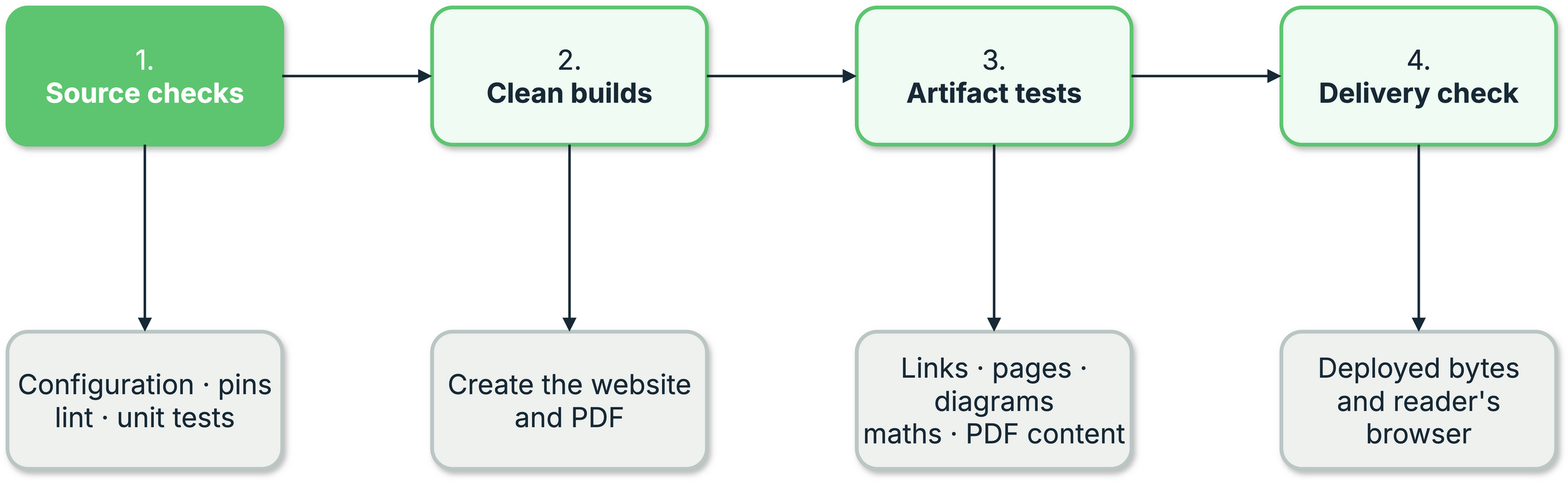
1. Built-output testing layers
Quick start
No conftest.py wiring is needed - the fixtures register themselves
through pytest's plugin entry point:
from prodockit.testing import assert_no_unrendered_mermaid, assert_no_unrendered_tex
from prodockit.testing import assert_project_integrity


def test_the_source_project_is_complete():
    assert_project_integrity()


def test_the_pdf_built(prodockit_pdf):
    assert prodockit_pdf.page_count > 5


def test_diagrams_and_maths_actually_rendered(prodockit_pdf_page_texts):
    assert_no_unrendered_mermaid(prodockit_pdf_page_texts)
    assert_no_unrendered_tex(prodockit_pdf_page_texts)
assert_project_integrity() checks the source project before a successful
build can conceal missing inputs. It verifies local website and PDF style
sheets and scripts, navigation pages, Markdown images, an explicitly selected
CSL file, configured Mermaid and maths renderers, and Prodockit syntax whose
extension has been switched off. Remote CSS, JavaScript and images are outside
this local check; URL fragments such as #only-light are removed before a
local image path is checked.
The same checks are available without pytest:
This also rejects stale, misspelled or invalid Prodockit settings. It reads the project only; it does not build, commit or change anything.
Why the rendering checks exist
prodockit.pdf pre-renders Mermaid diagrams and TeX maths to static
images, because WeasyPrint has no JS engine. When a renderer isn't
installed, the content is left exactly as it is rather than failing the
build - the right default for a project using neither feature, and a
silent disaster for one that does.
Three separate projects published PDFs containing raw flowchart LR ...
source and literal LaTeX before anyone noticed.
prodockit pdf warns about it
since 0.12.0, but a warning in build output is easy to scroll past. These
checks turn it into a test failure.
They are deliberately narrow about what counts as evidence. Several Mermaid
diagram types are also ordinary English words - graph, pie, journey,
timeline - and line breaks in a PDF fall wherever the text happens to
wrap. A check that flagged any line starting with one of those read "a
visual commit graph and richer history browsing" as an unrendered diagram,
passing locally and failing in CI only because different fonts there wrapped
the sentence differently. So a diagram-type keyword is only evidence when
Mermaid's own link syntax follows shortly after it.
Fixtures
All are session-scoped and prefixed prodockit_, so they can't collide
with names in your own conftest.py.
Table 12.1 lists the supplied pytest fixtures and the built artifact exposed by each one.
1. Fixtures
| Fixture | What it gives you |
|---|---|
prodockit_paths |
Resolved root, config_file, docs_dir, site_dir, pdf |
prodockit_config |
Your Zensical config as plain parsed TOML |
prodockit_resolved_config |
The same, through Zensical's own loader - nav resolved to a tree |
prodockit_nav_pages |
Every nav markdown file, docs_dir-relative, in nav order |
prodockit_pdf |
The built PDF, opened with pymupdf |
prodockit_pdf_page_texts |
The PDF's text, one string per page |
prodockit_site_dir |
The built site directory |
prodockit_site_html_files |
Every built HTML page, sorted |
prodockit_soup_for |
Factory: parses one built HTML file with BeautifulSoup |
The fixtures in Table 12.1 take paths from your config
rather than an assumed layout: site_dir
defaults to site but is commonly set to public, and the PDF follows
pdk-pdf.toml's [document].output when you set it.
Configuration
Two pytest ini options, both usually unnecessary:
Table 12.2 explains the two optional pytest settings and their defaults.
2. Configuration
| Option | Default | Purpose |
|---|---|---|
prodockit_config_file |
zensical.toml |
Your Zensical config, relative to the pytest rootdir. |
prodockit_pdf |
from the config | Override the PDF location. |
Paths resolve against pytest's rootdir
Not against the test file. If your tests live outside the project root,
or you invoke pytest from elsewhere, set prodockit_config_file or
pass --rootdir.
Checks
From prodockit.testing:
Table 12.3 lists the built-output assertions and the defect each one detects.
3. Checks
| Function | Purpose |
|---|---|
assert_project_integrity(config_file="zensical.toml") |
Fails once with every missing source input or disabled extension. |
find_project_problems(config_file="zensical.toml") |
Returns the individual project integrity problems for custom assertions. |
assert_no_unrendered_mermaid(page_texts) |
Fails if any page carries raw Mermaid source. |
assert_no_unrendered_tex(page_texts) |
Fails if any page carries raw TeX. |
find_unrendered_mermaid_pages(page_texts) |
The offending page indexes, for a custom message. |
find_unrendered_tex_pages(page_texts) |
As above, for maths. |
contains_unrendered_mermaid(text) |
Single-page predicate. |
contains_unrendered_tex(text) |
Single-page predicate. |
The assertions in Table 12.3 name the fix (pdk pdf,
which prepares a required project-local renderer cache) in their failure
message rather than only reporting the symptom.
Contributor guidance for keeping the automatically discovered plugin lightweight lives under Development and code map.