PDF pipeline and API
This PDF pipeline page is for contributors changing prodockit.pdf or calling its Python
API directly. Document authors should use Generate a PDF.
Follow the pipeline
The PDF build starts only after Zensical has produced a complete website. Prodockit reads those generated articles in navigation order, removes website-only structure, and assembles one HTML document. Pandoc and the Lua filter then prepare that document for WeasyPrint, which lays out the pages; the optional final step extracts the index before the PDF is written.
Figure 49.1 shows this sequence across the top row and then the bottom row. Each box names either the form of the document at that point or the component responsible for the next change.
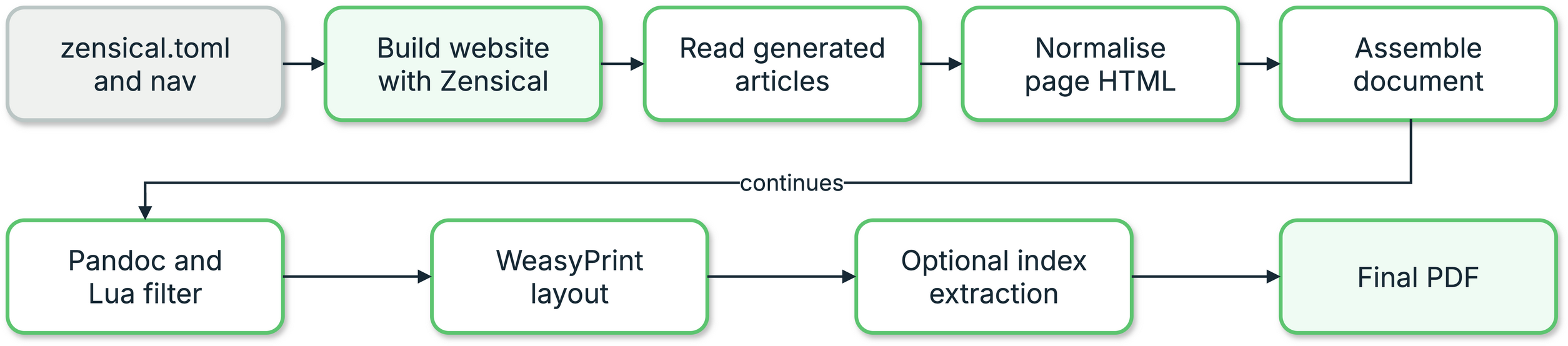
1. PDF generation pipeline
The public prodockit pdf command validates the completed Zensical site, reads
each navigation page's generated article, and constructs Page objects from
that output. It inspects those objects for active Mermaid and arithmatex
elements before discovering or constructing either optional renderer, then
pre-renders only the content that is present and calls the lower-level builder.
A generated index adds a second layout pass after term pages are known.
The command never invokes Zensical or cleans the configured site_dir.
Passing --markdown-file narrows only the pages assembled into the PDF; the
requested article must already exist in the completed site. This keeps a
single-page PDF quick without allowing it to conceal an incomplete website
build.
Run zensical build --clean --strict before pdk pdf. The completed site is
the single supported input; Prodockit no longer contains a second renderer
using undocumented Zensical Python interfaces.
Use the public Python surface
Choose the public entry point that matches the caller's available input from Table 49.1.
1. Use the public Python surface
| API | Purpose |
|---|---|
build_pdf_from_built_site() |
High-level build using navigation, settings, and the completed Zensical site |
build_pdf() |
Lower-level build from prepared Page objects |
Page |
One rendered source page plus its path, appendix, index, and running-header metadata |
PdfBuildError |
Build failure carrying the underlying command output |
build_source_bundle_from_zensical_config() |
High-level Markdown/configuration source-bundle build |
Of the entry points in
Table 49.1, prefer
build_pdf_from_built_site() when a caller already has a Zensical
project. Use build_pdf() only when the caller owns page rendering and can
supply complete HTML and metadata.
from prodockit.pdf.config import build_pdf_from_built_site

output = build_pdf_from_built_site("zensical.toml")
print(output)
The CLI wraps these functions with progress reporting, captured diagnostics, and non-zero exit status; the functions return paths or raise exceptions.
Know the internal modules
Table 49.2 maps each internal module to the transformation it owns.
2. Know the internal modules
| Module | Responsibility |
|---|---|
prodockit.project_config |
Direct TOML/YAML reading for the settings Prodockit consumes |
prodockit.pdf.site |
Completed-site validation and generated-page extraction |
prodockit.pdf.config |
Navigation, metadata, optional renderers, and high-level entry points |
prodockit.pdf.build |
Pipeline orchestration and external-command execution |
prodockit.pdf.html |
Page fix-ups, front matter, web/PDF-only content, and heading structure |
prodockit.pdf.lua |
Pandoc Lua filter generation |
prodockit.pdf.css |
Renderer foundations, dynamic page settings, running headers/footers, and duplex layout |
docs/stylesheets/pdk-pdf.css |
Managed PDF presentation defaults that authors can override in print.css |
prodockit.pdf.icons |
Project icon discovery and SVG recovery from built CSS |
prodockit.pdf.mermaid |
Isolated Python Mermaid rendering and diagram assets |
prodockit.pdf.source_bundle |
Markdown/configuration source PDF |
prodockit.pdf.index |
Marker extraction, term-page mapping, and generated index |
prodockit.pdf.release |
Host release lookup for cover markers |
prodockit.pdf.runtime_config |
Strict project-root pdk-pdf.toml policy and supported defaults |
prodockit.pdf.runtime_store |
Project-local locks, archive validation, smoke tests, atomic activation, and fallback state |
prodockit.pdf.runtime_prepare |
Provider-gated pdk pdf --prepare orchestration |
prodockit.pdf.weasyprint_runtime |
Official Windows x64 artifact pin, bounded download, absolute-path probe, and cache executable resolution |
Use Table 49.2 to locate the owner of a transformation before changing it. Keep transformation stages narrow. A change to HTML normalisation, CSS, the Lua filter, or an external tool can affect every page, so verify the complete PDF and built-output tests rather than relying on a unit test of the changed module alone.
Preserve source-bundle boundaries
The prodockit source-bundle command includes root README.md, Markdown below
docs_dir, and the active Zensical config. Root-level generated Markdown such
as changelog, contribution, and licence files stays outside that boundary. It
is intentionally separate from the rendered-document
pipeline: it discovers files with git, writes a self-contained HTML document,
and calls WeasyPrint without Pandoc. The lower-level source-bundle API can
discover every non-ignored text file for a specialised caller, but that is not
the command-line default.
Preserve real footer markup
Copyright text can contain links and line breaks, so it cannot be flattened
into a CSS string. The PDF pipeline writes it as an HTML element and places it
in the repeated footer with CSS Paged Media's position: running() and
content: element(). Check the finished PDF when changing this path;
intermediate HTML alone does not prove that links or line breaks survived.
Preserve the runtime trust boundary
pdk-pdf.toml contains committed intent only. Machine-specific resolved
state belongs below .prodockit/cache/pdf/, rooted beside the selected
Zensical configuration so separate projects and virtual environments never
share an active runtime accidentally.
Providers may resolve an approved artifact and copy it into a requested staging path. They do not choose its activation path or extract it themselves. The common store verifies the exact SHA-256, rejects traversal, links, duplicate paths, encrypted ZIP members, special TAR members, excessive entry counts and excessive expansion, checks required content, then runs the provider's fresh-runtime probe. Only that validated staging directory can be atomically activated. A failure retains and reports the current or previous known-good runtime.
The first G1 dependency baseline was measured on the development macOS ARM64 environment on 19 September 2026. These are installed-file sizes rather than download sizes and are evidence for later optionalisation, not release budgets. Table 49.3 records that starting point.
3. G1 base dependency baseline
| Base distribution | Resolved version | Installed files | Installed bytes |
|---|---|---|---|
pypdf |
6.18.0 | 124 | 3,990,895 |
mermaidx |
0.9.5 | 48 | 5,364,347 |
quickjs-ng |
0.16.2.1 | 9 | 1,249,527 |
Importing prodockit.cli did not import any of those three distributions;
the measured wall time was 0.36 seconds on that host. Repeat the installed
size and cold-import measurement in G5 before removing the PDF-only packages
from the base dependency set.
The G2 lazy boundary uses the same HTML parser as the lower-level missing- renderer warnings. On the 60-page contributor guide built on macOS ARM64, a 20-run sample detected the required renderers in a median 84.39 ms (maximum 89.79 ms). The parser is platform-independent Python and is covered on the supported macOS, Ubuntu, and Windows test matrix. Plain-page configuration tests replace Mermaid and MathJax discovery and construction with hard failures, proving that unused components perform no probe, worker, directory, install, or network work; active Mermaid and maths fixtures prove the existing callbacks and output inputs remain selected when required. G2 changed no default renderer and made the external Mermaid fallback independently deletable; that fallback and its configuration were subsequently removed.
Preserve actionable errors
PdfBuildError reports which external command failed and retains its captured
output. BuiltSiteError identifies a failed Zensical command, a missing
generated article, or a generated HTML layout that no longer exposes the
expected article. The legacy wrapper separately names a changed private
Zensical render-result shape. Do not replace these with an unlabelled
subprocess status or raw selector failure; callers need to know which boundary
changed.
MermaidRenderError identifies the failed diagram number and a bounded failure
category without echoing diagram source. It stops the supported PDF pipeline
before Pandoc can replace the requested PDF or the result can be copied into
the built site. MermaidBackendUnavailableError remains separate because a
missing or corrupt prepared runtime needs different corrective action.