Build and release
This page documents the release process for taking prodockit from an accepted change to a package on PyPI and a documentation site that shows the same release. It describes this repository's real GitHub Actions workflows rather than a generic Python release.
A release is deliberately split in two:
- A pull request changes and validates the source.
- A published GitHub release creates the tag and authorises publishing.
Do not publish a GitHub release from an unmerged branch. publish.yml builds
the tagged source, while the documentation redeploy is deliberately run from
main; both must describe the same commit.
Understand the workflow chain
Two independent events start the automation. A release branch opens the pull
request path: scoped and core checks run before the branch is merged, after
which the package and documentation are published from main. A weekly timer
starts only the drift comparison and never publishes a release.
Figure 18.1 shows those entry points in solid green. Follow the release branch down the centre and left of the diagram; the separate scheduled path is on the right.
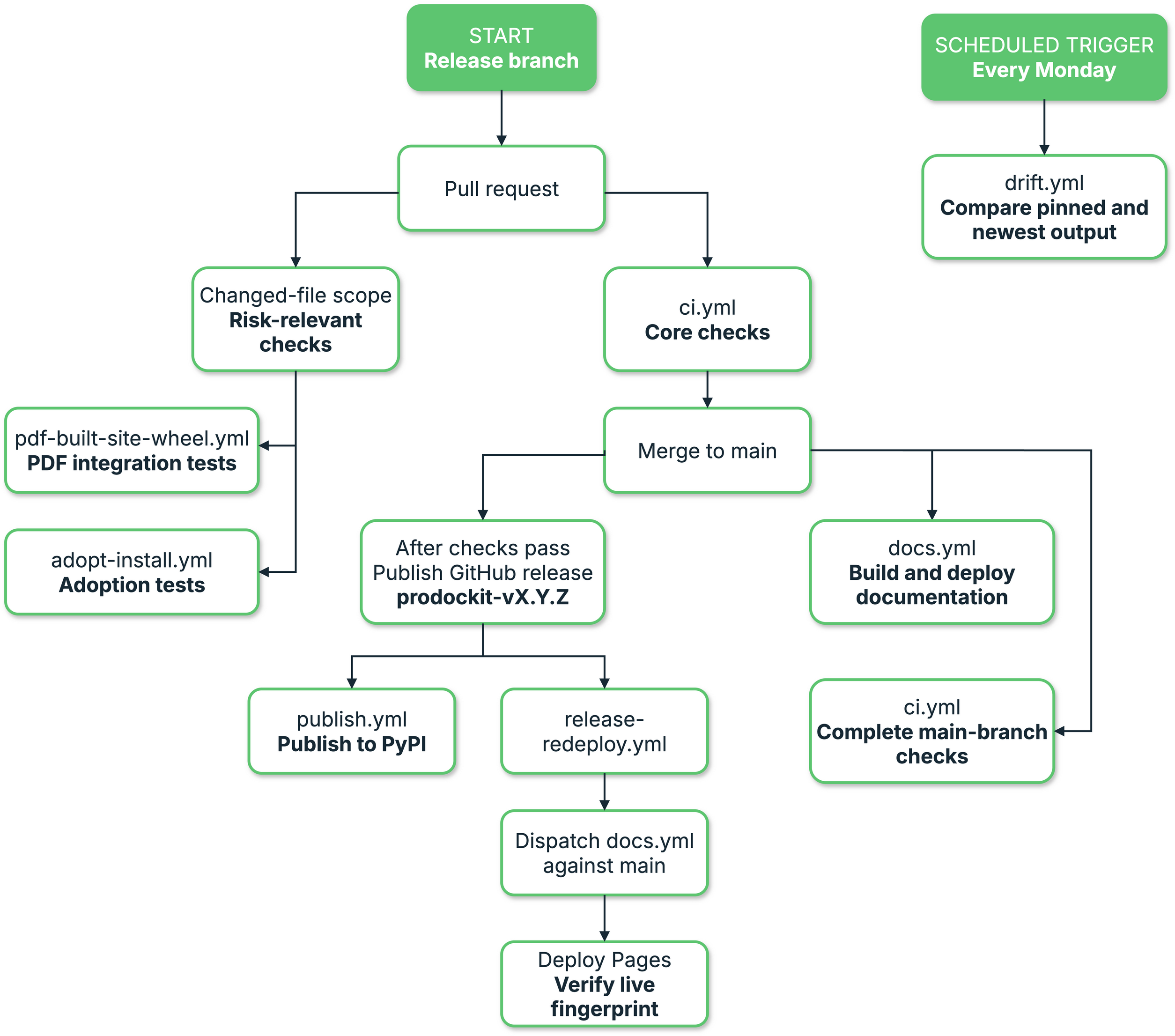
1. Release and continuous-integration workflow
The solid green boxes are entry points: a maintainer starts the release path from a release branch, while GitHub starts the drift path on its weekly schedule. The other boxes are actions or workflow stages that follow.
Table 18.1 maps each workflow file to its trigger and responsibility.
1. Understand the workflow chain
| Workflow | Trigger | Responsibility |
|---|---|---|
adopt-install.yml |
Relevant pull requests and pushes to main; weekly schedule; manual dispatch |
Build and install the wheel on Ubuntu x64/ARM64, Windows x64, and macOS ARM64; exercise TOML/YAML component choices without provisioning PDF runtimes; and verify initial, warm, recovery and template-sync paths. |
bootstrap-install.yml |
Relevant pull requests and pushes to main; weekly schedule; manual dispatch |
Build and install the wheel on Ubuntu x64/ARM64, Windows x64, and macOS ARM64, then exercise new- and existing-repository routes. A version-changing release pull request also exercises Bootstrap's real VS Code, Git, Python-environment and editor-extension installs. |
bootstrap-live-provider-github.yml |
Protected manual dispatch for one exact main commit |
Run the shadow GitHub live-provider gate in three fresh jobs: a user-authorised reset, the two Bootstrap paths with only the destination deploy key, and an independently authenticated seal that removes the test repository before accepting the result. The shadow result does not yet authorise publication. |
bootstrap-live-provider-surrey-connectivity.yml |
Manual dispatch without secrets | Prove that GitHub-hosted Ubuntu and macOS runners can reach the Surrey API and SSH service and observe the independently reviewed SSH fingerprint before any Surrey credential is stored in GitHub. |
bootstrap-live-provider-surrey.yml |
Protected manual dispatch for one exact main commit |
Run the Surrey GitLab live-provider gate from three fresh GitHub-hosted jobs. Reset and seal receive the isolated-group token; the candidate receives only the fixed repository key. A successful seal retains closed state for the next exact reset. |
bootstrap-live-provider-surrey-recovery.yml |
Protected manual dispatch after an interrupted Surrey run | Validate the exact unsuccessful workflow, use its reset handoff when available, then remove the fixed reviewed destination deploy key. It cannot delete the project or produce release evidence. |
.gitlab-ci.yml |
Protected manual pipeline in the fixed Surrey mirror for one exact public GitHub main commit |
Hold one non-cancelling lifecycle lock while a child pipeline runs three credential-separated jobs: a group-token reset, both Bootstrap paths with only the Surrey deploy key, and a fresh group-token seal. The pipeline fetches the exact public source rather than assuming that the mirror is current. Its shadow result does not yet authorise publication. |
release-gate.yml |
Protected manual dispatch after both live-provider runs | Resolve both immutable GitHub Actions provider runs through the GitHub API, require the six ordinary release workflows and any active protected-main status checks, rebuild the wheel, compare canonical contents and retain public-safe combined evidence. This remains a shadow and cannot publish. |
pdf-built-site-wheel.yml |
Relevant pull requests and pushes to main; weekly schedule; manual dispatch |
Build and install the wheel on Linux x64/ARM64, Windows x64, and macOS ARM64; exercise the public prodockit pdf renderer and its default Python-only Mermaid backend through a clean Zensical build; and verify navigation, rendered extensions and page metadata without a Git host or Node/npm |
weasyprint-windows-s0.yml |
Changes to the Windows provider/handoff or manual dispatch | Retain the S0 artifact evidence, then exercise cold/warm production preparation, the Pandoc handoff, direct source-bundle rendering, PDF semantics and timing evidence on Windows x64 |
ci.yml |
Pull requests and pushes to main; weekly schedule; manual dispatch |
Test Python 3.14 for every change, add the oldest supported Python when executable code can change, and select Python 3.10–3.14 for dependency, workflow and classifier changes. Weekly and manual runs always use the complete version matrix. Lint, type-check, verify pins and collect coverage once, strictly build the site, and validate both package artifacts on every run. |
diag-repair.yml |
Pull requests, merge groups, pushes to main, and manual dispatch |
Build the candidate wheel independently in five environments: Ubuntu and macOS x64/ARM64, plus Windows x64. Each environment creates one project with all four repairable diagnostic checks failing, confirms every action separately, and verifies the repaired state and recovery manifests. Separate upgrade and downgrade wheel jobs on all five environments start from unmodified published artifacts, align the supported toolchain, verify that installed code changed, verify Diagnostics and Pins, repeat the run for idempotence, and retain failure reports. The upgrade installs real previous Python packages and Pandoc; because the supported Python pins are already the newest publications, the genuine downgrade installs the adjacent newer Pandoc release. |
pdf-runtime-g4.yml |
Relevant PDF-runtime pull requests and manual dispatch | On Ubuntu and macOS x64/ARM64 plus Windows x64, measures cold/warm project-cache preparation, builds a real PDF, checks embedded project fonts, and proves bibliography-only use prepares only Pandoc. |
pdf-runtime-g5.yml |
Relevant optional-renderer pull requests and manual dispatch | On Ubuntu x64/ARM64, macOS ARM64, and Windows x64, downloads MathJax from GitHub and Mermaid wheels from PyPI into an empty project cache, verifies their immutable provenance, proves offline warm reuse, and renders both into a real PDF. |
pdf-configuration-g7.yml |
PDF configuration or Adopt migration changes; manual dispatch | Migrates a real template checkout to pdk-pdf.toml, builds its website and PDF, proves offline cached reuse, and verifies that a failed renderer request preserves the last-known-good cache. |
docs.yml |
Pushes to main; manual dispatch |
Build the complete PDF and selected single-page PDFs, strictly build the website, run built-output tests, deploy Pages, then verify the live page matches the uploaded artifact |
drift.yml |
Monday schedule; manual dispatch | Build with pinned and newest rendering dependencies, compare artifacts, run checks against the newer build, and open or update an issue rather than failing for mere availability |
zensical-compatibility.yml |
Changes to compatibility checks; manual dispatch | Compare exact Zensical releases across supported Python/OS configurations; manual full qualification builds both complete projects and the template source bundle, and preserves known failures and output differences |
publish.yml |
Published GitHub release | Build source and wheel artifacts from the release tag, validate their metadata and rendered README with Twine, then publish them to PyPI through Trusted Publishing |
release-redeploy.yml |
Published GitHub release; manual dispatch | Start docs.yml against main after the new tag exists, so the cover and macros can show the new release without deploying from a tag ref |
The workflow roles in Table 18.1
overlap intentionally. ci.yml gives quick pull-request feedback and keeps a
scope-aware post-merge check. One repository-owned classifier calculates a
complete Git change range and selects expensive checks conservatively: an
unknown implementation file, an unreadable range, or a manually applied
full-ci label selects everything. adopt-install.yml,
bootstrap-install.yml, and pdf-built-site-wheel.yml test their installed
wheel independently across Ubuntu x64/ARM64, Windows x64, and macOS ARM64
only when their owned code can change. Unit-test-only changes do not
start native runners. Weekly and manual runs remain comprehensive, which is
the safety net for an ownership rule that proves incomplete. docs.yml proves and publishes the complete artifacts;
publish.yml has the narrow permission needed for PyPI; the redeploy fixes
release-tag timing; and drift.yml observes future upgrades without changing
the current release.
The Bootstrap workflow deliberately has two levels. Its fast hermetic routes run for relevant implementation changes and retain complete GitLab/GitHub decision coverage without depending on outside services. The slower real installer matrix runs when the package version changes, when that matrix's own implementation changes, or when requested manually. It crosses the live package-manager and download boundary on disposable runners, but still uses no GitHub or GitLab user account. A release therefore detects installer-source, download, architecture and native-library failures before publication without making every ordinary pull request wait for five fresh machine installations.
The separate live-provider workflows are protected shadow controls rather than pull-request tests. They are not a step in the normal package-release procedure and publishing a release does not require or start them. Run one only for a deliberate live-provider validation exercise. Each dispatch now requires the operator to type its complete fixed destination before any job can reach a credential-bearing environment; this prevents a release commit or an unrelated workflow choice from being mistaken for authorisation to mutate a provider.
The GitHub workflow mutates only the fixed private
repository buckwem/bootstrap-release-gate. The GitHub App installation token
originally designed for this control cannot create a repository in a personal
namespace: GitHub supports that endpoint with a fine-grained personal token or
a GitHub App user token, but not an installation token. The lifecycle token is
therefore stored only in the manually approved reset and seal environments,
checked against the buckwem account at runtime, and constrained in code to the
single fixed repository. It creates that repository immediately before the test
and deletes it during the seal, including after a rejected candidate. This token
has wider account scope than the deploy key, so the candidate receives only the
fixed repository's deploy key.
Configure PRODOCKIT_LIVE_GITHUB_LIFECYCLE_TOKEN as an environment secret in
both bootstrap-live-github-reset and bootstrap-live-github-seal. For a
fine-grained personal token, select buckwem as the resource owner, grant
access to all repositories so the token can create the currently absent fixed
repository, grant repository Administration read and write, and grant Pages
and Webhooks read-only access. Grant Contents read-only access so the reset and
seal controllers can compare the destination's branches with the candidate
record. Do not expose this token as a repository-wide secret or to the candidate
environment.
GitHub retains deleted repositories for recovery, including their deploy-key registrations. A fixed deploy key therefore cannot be attached when the same test repository is recreated. The reset job instead generates a new Ed25519 deploy key for every run. It registers the public half and encrypts the private half before passing it through the workflow artifact boundary. The reset job removes its plaintext copy immediately after encryption. The candidate can decrypt the artifact, while the artifact itself and the seal job cannot provide Git access. The sealer revokes the run-scoped key and removes the repository.
The fixture keeps GitHub Actions and Pages disabled throughout the candidate run. Bootstrap's Pages stage is therefore deferred only in this harness: an empty private repository cannot expose that setting to the candidate, and enabling it would allow untrusted candidate content to execute or publish. The ordinary Bootstrap tests continue to cover the user-facing Pages decision; the live-provider run remains focused on authenticated repository reads, the single permitted push, the existing-repository path and cleanup.
Create one 4096-bit RSA wrapping pair on a trusted computer. Keep the private file outside the repository:
umask 077
openssl genpkey -algorithm RSA -pkeyopt rsa_keygen_bits:4096 \
    -out prodockit-live-github-wrap-private.pem
openssl pkey -in prodockit-live-github-wrap-private.pem -pubout \
    -out prodockit-live-github-wrap-public.pem
Store the complete public PEM as
PRODOCKIT_LIVE_GITHUB_KEY_WRAP_PUBLIC_KEY in
bootstrap-live-github-reset. Store the complete private PEM as
PRODOCKIT_LIVE_GITHUB_KEY_WRAP_PRIVATE_KEY only in
bootstrap-live-github-candidate. Store GitHub's reviewed SSH host-key record
as PRODOCKIT_LIVE_GITHUB_KNOWN_HOSTS in the candidate environment as well.
The encrypted deploy-key artifact is bound to the public-key fingerprint in the
reset handoff before the candidate loads it. Delete the obsolete
PRODOCKIT_LIVE_GITHUB_DEPLOY_PUBLIC_KEY and
PRODOCKIT_LIVE_GITHUB_DEPLOY_PRIVATE_KEY secrets after this change is live.
Restrict all three environments to main. Never put the lifecycle token or RSA
wrapping private key in the same environment. The wrapping private key cannot
access GitHub: it can only decrypt the one-time repository credential generated
inside a reviewed workflow run.
For a deliberate GitHub exercise, dispatch Bootstrap live provider — GitHub
shadow with the full commit currently at protected main and type
buckwem/bootstrap-release-gate in the live target confirmation field. Do not
use this workflow merely because the same commit is being released.
The Surrey pipeline mutates only
assessment-liveprovider-2026/report-liveprovider-2026-mb0105 and runs from
the fixed mb0105/prodockit-extensions mirror. Each provider separates reset,
candidate, and seal into protected jobs so no job can receive both a lifecycle
credential and a repository deploy private key. A successful seal retains the
verified private project as closed state after removing its write key. The
protected release-gate shadow resolves both GitHub Actions
run IDs through the GitHub API, requires the six ordinary release
workflows for that exact commit plus any active protected-main status checks,
rebuilds the candidate wheel and compares canonical contents before it
retains combined public-safe evidence. Until the dual-provider shadow
acceptance criteria have passed, these workflows supply evidence only:
publish.yml remains unchanged and cannot treat a provider or coordinator
result as release approval.
The protected GitLab pipeline has the same deliberate-dispatch boundary. Set
PRODOCKIT_LIVE_CONFIRM_TARGET to
assessment-liveprovider-2026/report-liveprovider-2026-mb0105; leave it blank
for every ordinary pipeline and release.
The Phase 5 migration also makes the Surrey test available as a protected GitHub Actions workflow. Run Bootstrap live provider — Surrey connectivity before configuring credentials. It performs only DNS, TLS, port and public host-key observations. A failed probe means the hosted-runner design is not usable on the current Surrey network; do not weaken SSH verification or expose the service more widely to make the test pass.
Create the GitHub Environments listed in
Table 18.2, restrict each to
protected main, and store the named values as environment secrets.
2. Separate the Surrey GitHub workflow credentials
| Environment | Secrets |
|---|---|
bootstrap-live-surrey-reset |
PRODOCKIT_LIVE_SURREY_GROUP_TOKEN, PRODOCKIT_LIVE_SURREY_FIXTURE_JSON, PRODOCKIT_LIVE_SURREY_DEPLOY_PUBLIC_KEY |
bootstrap-live-surrey-candidate |
PRODOCKIT_LIVE_SURREY_DEPLOY_PRIVATE_KEY, PRODOCKIT_LIVE_SURREY_KNOWN_HOSTS |
bootstrap-live-surrey-seal |
PRODOCKIT_LIVE_SURREY_GROUP_TOKEN, PRODOCKIT_LIVE_SURREY_FIXTURE_JSON |
The reset environment is the one human approval boundary. Do not require a
second approval for candidate or seal: a waiting seal could leave repository
write access active. The group token must be restricted to the otherwise empty
assessment-liveprovider-2026 test group. The candidate key must be dedicated
to this fixture and usable non-interactively on a disposable runner; never use
a personal SSH key or export a 1Password-managed identity. Enter the group
token separately in reset and seal so the candidate environment cannot resolve
it. Disable administrator bypass where the repository settings permit it.
Normally dispatch Bootstrap live provider — Surrey GitLab with only the
full commit currently at protected GitHub main, then type
assessment-liveprovider-2026/report-liveprovider-2026-mb0105 in the live
target confirmation field. It discovers the newest
valid sealed state from earlier runs. The optional prior-run field is for an
authorised recovery from artifact-discovery failure and still accepts only a
successful earlier run of this exact workflow. If a run is cancelled after
reset, dispatch Bootstrap live provider — Surrey recovery seal with that
failed run ID and its release commit. Recovery only revokes the exact key; it
does not make the failed run releasable.
Leave the controlled candidate-failure and stale-main exercise options off during an ordinary run. They are maintainer tests for the fail-closed paths and deliberately finish with a failed workflow after repository access is revoked.
Keep the GitLab pipeline as the inactive rollback route until the GitHub-hosted workflow has passed absent-project, repeated retained-project, candidate failure, stale-commit and cancellation-recovery exercises. Never run both Surrey lifecycle controllers at the same time because their concurrency locks belong to different providers.
This is the deliberate balance between time and maintenance complexity. The native matrices remain complete once selected rather than introducing a second layer of partial platform scenarios. All four workflows expose one stable result job for branch protection, while their detailed jobs may be selected or skipped. Post-merge validation remains enabled until those stable result checks are required by the repository ruleset; removing it sooner would save time by relying on a protection that had not yet been enforced.
1. Choose the release version
Use semantic versioning as a decision aid:
Table 18.3 maps patch, minor, and major versions to the kind of change being released.
3.
- Choose the release version
| Change | Version |
|---|---|
| Backward-compatible fixes or documentation corrections | Patch |
| New backward-compatible commands, options, or extension features | Minor |
| An intentional incompatible public change | Major—or the repository's agreed pre-1.0 policy |
Use Table 18.3 to translate the
reviewed change into a version increment. Read every change since the previous
prodockit-v... tag. The Git history is
the complete record; the website release notes intentionally contain only
short changes that matter to package users:
The tag prefix matters. Historic tags named only vX.Y.Z exist, but current
package releases use prodockit-vX.Y.Z, such as prodockit-v0.41.0.
2. Prepare the release branch
Create the release metadata on a branch based on the latest main, then let
the repository checks validate that exact change.
-
Start from current main
Replace
0.42.0throughout this page with the version being prepared. -
Update both code version sources
The package version is declared twice:
They serve different readers: build metadata supplies the wheel and PyPI;
prodockit.__version__supplies Python callers andprodockit --version. Leaving either behind publishes two answers about one release. -
Finish the release notes
In
docs/about/changelog.md, replace the one## Unreleasedheading with:Review every merged change since the previous tag. Add missing entries and write short bullets for a user deciding whether to upgrade: added or changed behaviour and any action required. Do not reproduce defects, pull-request detail, or commit subjects; Git commits, issues, pull requests, tags, and GitHub Releases retain that history.
Keep each fix to one source line and each new feature to no more than two source lines. Combine closely related fixes when that makes the user-visible outcome clearer; do not spend separate bullets on internal implementation work that does not change behaviour.
The changelog tests enforce one Unreleased section at most, its position, newest-first released versions, and its website-only policy. They do not know whether a user-relevant change was omitted, so the comparison with
git logis still required. -
Check descriptions exposed outside the guide
If the release changes the public capability set, update the places a reader sees before opening the full documentation:
README.md, rendered on GitHub and PyPI;- the
[project].descriptioninpyproject.toml, used as PyPI's summary; - the package docstring in
src/prodockit/__init__.py, shown by Python help.
Tests guard extension inventories, but prose describing a changed command or capability still needs review.
3. Run the local release gates
Activate the development environment first. On Apple Silicon macOS, expose Homebrew's Pango libraries in the same terminal that will run the gates:
Use /usr/local/lib on an Intel Mac. If this is missing, the PDF-backed tests
typically fail with cannot load library 'libgobject-2.0-0' even though
brew install pango has completed. This is a loader-path problem, not evidence
of a code regression or a missing Python package.
Run the same logical gates as ci.yml:
Because this repository publishes a PDF as part of its documentation, build the strict website first and then let the PDF command consume it:
Then verify the release identity directly:
python -m pip install "twine==7.0.0"
python -m build
python -m twine check --strict dist/*.whl dist/*.tar.gz
python -m zipfile --list dist/prodockit-0.42.0-py3-none-any.whl
prodockit --version
Twine validates the metadata and renders the README.md description from both
the wheel and source distribution using PyPI's rules. --strict turns a
rendering warning into a failed release gate. Twine is installed only for this
package check; it is not a dependency for authors using Prodockit.
The wheel filename and command output should both say 0.42.0. Do not upload
the locally built dist/; publish.yml rebuilds from the immutable release
tag and publishes that artifact.
4. Open and merge the release pull request
Review the release diff before committing:
git diff --check
git status --short
git diff -- pyproject.toml src/prodockit/__init__.py docs/about/changelog.md
Commit, push, and open the pull request:
git add pyproject.toml src/prodockit/__init__.py docs/about/changelog.md
git commit -m "Release 0.42.0"
git push -u origin release/0.42.0
gh pr create --title "Release 0.42.0"
Only add files actually changed and reviewed; the command above is a checklist, not permission to commit unrelated work.
On the release pull request, ci.yml runs:
- the oldest and newest supported Python versions, because package metadata changed;
- the real Pandoc and WeasyPrint stack on Python 3.14;
- Ruff and mypy once;
prodockit pins --check --offline;- the ordinary test suite on both selected interpreters, with coverage collected once;
- a separate strict documentation build.
Changing pyproject.toml also selects both installed-wheel workflows, so a
release candidate still crosses every reviewed operating-system and processor
architecture. A writing-only pull request does not pay for those matrices.
Merge only after all required checks pass. After merging, wait for the new
main run of ci.yml—including Python 3.10–3.14 and both complete
installed-wheel matrices—and the first docs.yml deployment to succeed. That
first documentation build may still show the previous release because the new
tag does not exist yet; the release-triggered redeploy corrects it.
5. Publish the GitHub release
Create a release targeting the merged main commit. Publishing—not merely
saving a draft—is the event that starts PyPI publishing and the documentation
redeploy:
gh release create prodockit-v0.42.0 \
  --repo buckwem/prodockit-extensions \
  --target main \
  --title "prodockit 0.42.0" \
  --generate-notes
Before confirming, check:
- the tag is exactly
prodockit-v0.42.0; - the target is the merged release commit on
main; - the release title is
prodockit 0.42.0; - the notes describe the same release as
docs/about/changelog.md.
A tag with the right name on the wrong commit is still the wrong package. Do not delete and recreate tags casually once an artifact may have reached PyPI; package versions there are immutable.
6. Follow the release workflows
Two workflows start from the published release.
PyPI: publish.yml
The build job checks out the tag, installs build and the reviewed Twine
version, and runs python -m build. Before anything can be uploaded, Twine
strictly validates both the wheel and source distribution, including how
PyPI will render README.md. The job then uploads dist/ as a workflow
artifact. The publish job downloads that exact artifact in the protected
pypi environment and uses PyPI Trusted Publishing (id-token: write), so no
long-lived API token is stored in the repository.
Watch it with:
After success, verify the public package rather than relying only on the green workflow:
Documentation: release-redeploy.yml → docs.yml
The release event itself runs against a tag ref. GitHub Pages deployments from
that ref previously reported success while the public site kept serving the
old build. release-redeploy.yml therefore builds nothing: it dispatches
docs.yml --ref main with actions: write permission.
docs.yml then:
- checks out full history so
git describecan see tags; - installs pinned system, Python, Mermaid, and MathJax inputs;
- builds the complete PDF and selected single-page PDFs;
- strictly builds the website after the PDF;
- runs the built-output tests;
- uploads and deploys
site/; - fingerprints the uploaded
index.htmland polls the public Pages URL until it serves those exact bytes.
The single-page builds come from .github/docs-single-page-pdfs.toml. Every
navigated page is either a representative build or explicitly mapped to one;
tests/test_docs_pdf_matrix.py rejects an unclassified new page. All nine
authoring extensions and each audience overview are representatives, while
pages with the same material shape reuse one build to keep renderer work
bounded.
Only pages listed under [build] get a Download this page as PDF action.
The [covered] mappings describe test coverage, not substitute downloads.
After changing the matrix, run python tools/docs_page_pdfs.py generate and
commit the updated overrides/partials/page-pdf.html alongside it. CI checks
that the partial still matches the matrix.
After each successful single-page build, CI copies that page's PDF into
docs/page-pdfs/, retaining its source directory: for example,
extensions/headings.md becomes page-pdfs/extensions/headings.pdf. This
avoids filename collisions and preserves the downloads across the final clean
website rebuild. Immediately before publication,
python tools/docs_page_pdfs.py verify checks every PDF action against its
page-specific path and requires the PDF to exist in site/. Pages without
their own build must not offer the action. The CLI's existing flat PDF outputs
remain unchanged.
The workflow uses a pages concurrency group with cancellation disabled. A
queued later deployment must wait and supersede the earlier one; cancelling it
could leave the pre-release-tag build live.
Watch both workflows:
7. Verify the release as a user
Automation has separate success conditions, so perform separate public checks:
Table 18.4 separates package, documentation, and PDF checks so each public artifact is verified.
4.
- Verify the release as a user
| Check | What it proves |
|---|---|
GitHub release page shows prodockit-v0.42.0 |
The release and tag are public |
PyPI lists 0.42.0 and both wheel/source files |
Trusted Publishing completed |
A clean environment installs prodockit==0.42.0 |
Package metadata and dependencies resolve for a user |
prodockit --version prints 0.42.0 |
The installed code agrees with package metadata |
| Documentation cover shows the new release | The post-release main-branch redeploy completed |
docs.yml verify job passes |
The public Pages URL serves the artifact built by that run |
The public checks in Table 18.4 prove different parts of the release. A clean installation check can use a temporary virtual environment:
python -m venv /tmp/prodockit-release-check
/tmp/prodockit-release-check/bin/python -m pip install "prodockit==0.42.0"
/tmp/prodockit-release-check/bin/prodockit --version
Use the platform's corresponding activation or executable path on Windows.
Recover from a failed stage
Use Table 18.5 to resume from the last completed boundary without repeating publication work unnecessarily.
5. Recover from a failed stage
| Failure | Resume from |
|---|---|
| Pull-request CI fails | Fix the release branch; do not publish the release |
publish.yml build job fails |
Fix through a new commit and release version; the tag is the source of truth |
| PyPI publish job fails before upload | Correct the environment/Trusted Publishing problem and rerun the failed job |
| PyPI already contains the version | Never overwrite it; determine whether the existing files are correct and release a new version if code must change |
release-redeploy.yml fails |
Manually run gh workflow run docs.yml --ref main after fixing permissions or workflow availability |
| Pages deploy succeeds but verify fails | Inspect the response headers and rerun docs.yml; do not assume successful upload means successful delivery |
| Drift issue opens after release | Triage it as future maintenance; it does not invalidate the pinned release that just shipped |
After release
Return to ordinary development by creating a new ## Unreleased section when
the next user-visible change is made. Do not create an empty section merely as
release ceremony; the changelog test permits it to be absent between releases.
Downstream repositories that pin prodockit—especially prodockit-template
and the userguide—should update deliberately, rebuild their own site and PDF,
and use their own tests before adopting the release. Where a downstream
repository has a Surrey GitLab mirror, its release is not complete until the
mirror's main branch and matching release tag have also been updated and
verified.
Figure 18.2 shows the downstream sequence. Each repository first updates its version pin and shared files, then builds and tests its own outputs before making a separate release. A successful prodockit release starts this review; it does not bypass it.
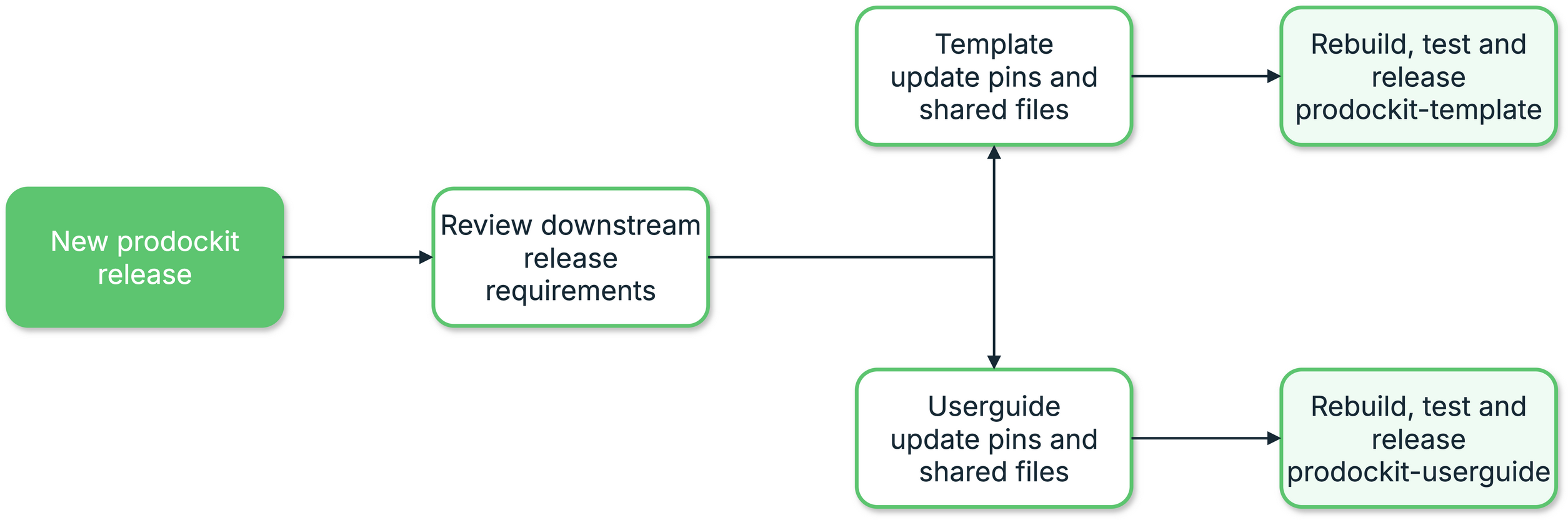
2. Downstream release cascade
Complete each downstream mirror
GitHub is the canonical source for prodockit-template and
prodockit-userguide; their University of Surrey GitLab repositories are
distribution mirrors used by student projects. A GitHub release alone does not
update either mirror. In particular, template-sync reads the template from
the host selected for the project, so a Surrey project continues to receive an
older Prodockit/Zensical combination while the Surrey template mirror is
behind.
Treat sync as an outcome, not as the creation of a branch or merge request. For each downstream repository:
- merge and verify the canonical GitHub release;
- fetch both repositories and reconcile the GitLab history with the exact GitHub release commit without force-pushing or discarding either history;
- update GitLab
maindirectly when its permissions allow it; - push the matching GitHub release tag so it points to the canonical release commit, not merely to a later GitLab merge commit;
- prove the GitLab
maintree is byte-for-byte identical to the GitHub release tree and that the GitLab tag resolves to the intended commit; and - remove the temporary sync branch and close any superseded sync request.
A merge request is a fallback for a protected branch or an explicitly
requested review, not the definition of a completed mirror sync. If one is
required, do not report the repository as synchronised while it remains open:
merge it, verify main, publish the tag, and then report completion. One
current request should replace, close, or contain any older pending sync; never
leave several cumulative requests for the maintainer to untangle.
Use a clean temporary worktree or clone for the reconciliation. These checks state the completion contract; substitute the repository's real remote names, release tag, and canonical release commit:
git fetch github main --tags
git fetch surrey main --tags
git diff --exit-code <github-release-commit> surrey/main
git ls-remote surrey refs/heads/main refs/tags/<release-tag>
The tree comparison may be empty even when GitLab main is a reconciliation
merge commit: that is expected when the histories differ. The tag must still
identify the exact canonical GitHub release commit. After synchronising the
template, run a preview from a disposable Surrey-hosted project and confirm
that template-sync reports the newly released template and supported
Prodockit/Zensical versions before applying it to a real project.