Choose your install
Prodockit supports three installation paths. Choose the one that matches the document and level of automation you have; the paths are alternatives rather than stages to complete in sequence.
Install Prodockit
This concise path assumes that:
- Python 3.14 is installed.
- Zensical is installed in an activated project virtual environment and the site has been initialized. Complete Zensical's Get started instructions first if that environment and site do not already exist.
-
Install Prodockit
With the initialized Zensical project's environment active, install Prodockit:
-
Enable the authoring extensions
Enable the Prodockit extensions your site uses in
zensical.toml. Add these tables to the existing configuration, omitting any feature you do not use. The dotted extension names must be quoted:[project.markdown_extensions."prodockit.headings"] [project.markdown_extensions."prodockit.refs"] [project.markdown_extensions."prodockit.glossary"] [project.markdown_extensions."prodockit.tables"] [project.markdown_extensions."prodockit.steps"] [project.markdown_extensions."prodockit.tree"] [project.markdown_extensions."prodockit.index"] [project.markdown_extensions."pymdownx.blocks.caption"] types = [ { name = "caption" }, { name = "figure-caption", prefix = "{}.", classes = "prodockit-figure-caption" }, { name = "table-caption", prefix = "{}.", classes = "prodockit-table-caption" }, ]Add
prodockit.bibliographyonly for bibliography files, orprodockit.citationsonly for inline citation definitions; these need their own configuration and a citation style. See Configure Prodockit features. -
Add the website stylesheets
Put this key in the existing
[project]table (do not add a second table):From the project root, run the following command. It:
- Creates
docs/stylesheets/if it does not exist. - Copies Prodockit's bundled
pdk.cssinto that directory, replacing any existing copy with the version from the installed Prodockit release. - Creates an empty
extra.cssonly if it is missing; it leaves an existingextra.cssand your custom styles untouched.
python -c "from pathlib import Path; from prodockit.shared_files import resource_bytes; p = Path('docs/stylesheets'); p.mkdir(parents=True, exist_ok=True); (p / 'pdk.css').write_bytes(resource_bytes('pdk.css')); (p / 'extra.css').touch(exist_ok=True)"Put your own CSS in
extra.css, not the release-managedpdk.css. The detailed Adopt route can instead configure the full standard integration for you. - Creates
-
Prepare local PDF support Optional
For optional local PDF generation, run the block for the current platform. Skip this on Windows ARM64 and let the GitLab pipeline generate PDFs instead.
pdk pdf --prepare allcreates and registers the PDF stylesheets before preparing the renderer; an ordinarypdk pdfdoes the same before rendering. You do not need to add PDF stylesheets in step 3. Do not add[project.markdown_extensions."prodockit.pdf"]tozensical.toml:prodockit.pdfis the PDF command's renderer, not a Markdown extension.On first use,
pdk pdf --prepare allmakes these changes:- Creates
pdk-pdf.tomlandpdf-requirements.txtif missing. It also addsdocs/stylesheets/pdk-pdf.cssand an emptydocs/stylesheets/print.cssif missing, then lists both under[document].extra_cssinpdk-pdf.toml. Existing PDF stylesheets are not overwritten;zensical.tomlis unchanged for a new project. - Installs the PDF-only Python packages in the active project environment and
downloads the PDF tools into the project's
.prodockit/cache/pdf/directory. A later run reuses the prepared files and cache when they are current.
--prepare alldoes not build a PDF or install host software such as Pango or Node.js; the platform command above installs those prerequisites. Review the project-file changes withgit statusbefore committing them. - Creates
-
Build and preview
Build and preview the site whenever its content changes:
This is the shortest path from a working Zensical site to a non-template Prodockit website. It deliberately leaves out machine preparation, repository and publishing setup, detailed PDF guidance, recovery guidance, and maintained-template integration. Choose one of the detailed installation paths below when you need those steps or want the setup checked as you proceed.
Choose an installation path
Figure 2.1 helps you choose between a template site, adopting Prodockit for a new or existing Zensical site, and a manual installation.
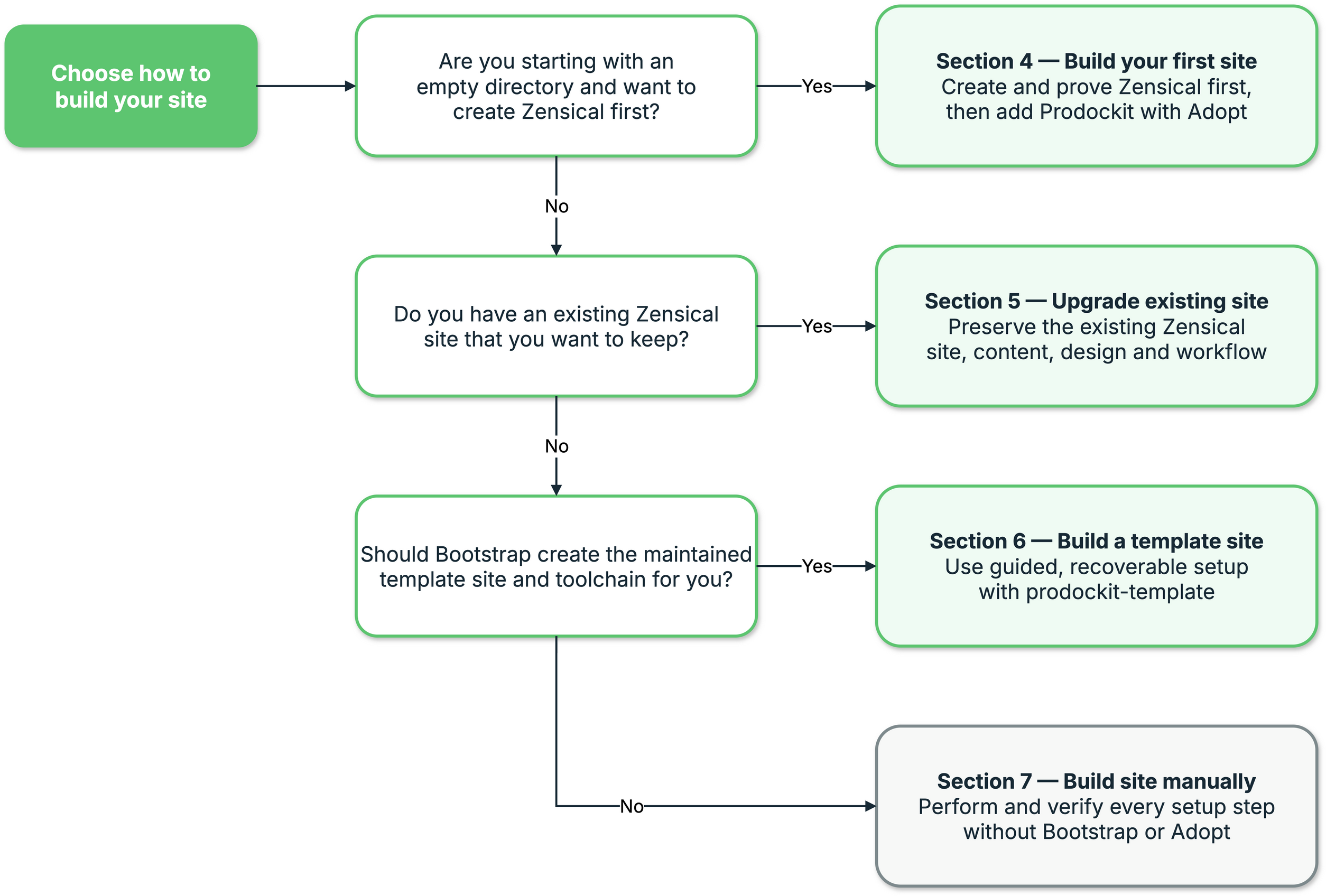
1. Choose the Prodockit installation approach
The three routes below compare their starting points and results in the same order as the following sections.
-
Adopt prodockit
Starting point: an empty directory and no Zensical site.
Create the Python environment, install Zensical, and prove that its local preview and strict build work. Then use Adoption to add Prodockit's authoring components and selected renderers without using the report template.
pdk pdfprepares PDF support if you use it later. -
Build a template site
Starting point: a new computer, no existing site, or a project that should use the maintained report template.
Bootstrap guides and verifies the machine setup, Git host, repository, project environment, build tools, and publishing configuration. The resulting site starts from
prodockit-templateand can later receive its maintained template updates. -
Build site manually
Starting point: a project whose author wants direct control of every installation decision and command.
Prepare and verify the machine, repository, editor, Python environment, Zensical configuration, renderers, website, PDF, and source bundle yourself. This manual installation route explains all dependencies but does not use Bootstrap or Adoption to orchestrate them.
These routes are alternatives, not stages in a longer sequence. Choose only one. In particular, do not run Bootstrap merely because an adopted or manually built project later needs PDF support.
Every route starts with Prepare to install. That shared preparation establishes the supported Python and a setup environment in the directory holding your repositories. Your chosen route then explains when to enter or create the project and activate its project-specific environment.