pdk bootstrap
Bootstrap uses two environments: activate the setup .venv in your parent
GitHub/GitLab working directory before installation, then activate the clone's
own .venv afterwards. Follow the post-install activation and checks
before running Diagnostics or Template Sync, including on a second pass with
an existing repository.
pdk bootstrap prepares a machine and a project created from
prodockit-template. pdk boot is an exact shorter alias.
For the installation procedure, use the Bootstrap task guide. This page defines the command interface, phases, activities, modes, and saved configuration.
Synopsis
Use one mutually exclusive mode for each Bootstrap run.
pdk bootstrap [--check | --dry-run | --apply | --configure] [--config PATH] [--verbose]
pdk boot [OPTIONS]
With no mode option, Bootstrap checks every activity and changes nothing. The four mode options are mutually exclusive.
Working directory
Run Bootstrap from the setup directory containing .pdkboot.toml, not from
inside the generated project. It also accepts a directory below that setup
directory because it searches the current directory and its parents. Use
--config PATH only when the configuration is deliberately elsewhere.
If Bootstrap cannot find the intended file, it treats the current directory as
a new setup location and asks for missing configuration. Stop if the proposed
project path or configuration questions are unexpected; do not save a second
.pdkboot.toml in the wrong directory.
Options
Table 35.1 lists the machine and project setup controls.
1. Bootstrap options
| Option | Behaviour |
|---|---|
--check |
Report each activity and change nothing. This is also the default. |
-n, --dry-run |
Print the commands an applied run could use without running them. |
-a, --apply |
Set up outstanding activities, asking before each change. |
--configure |
Ask the configuration questions again, save the answers, then stop. |
--config PATH |
Use a specific Bootstrap configuration instead of the nearest .pdkboot.toml. |
-v, --verbose |
Print each configuration operation and activity check or plan before it starts, so the last line identifies a stalled operation. |
--version |
Print the Bootstrap/Prodockit version and exit. |
-h, --help |
Show installed help and exit. |
Output
Bootstrap uses Prodockit's shared phases, activities, actions, and warning colours. Figure 35.1 shows the structure; use section 28.1, Scan phases and activities for the complete explanation:
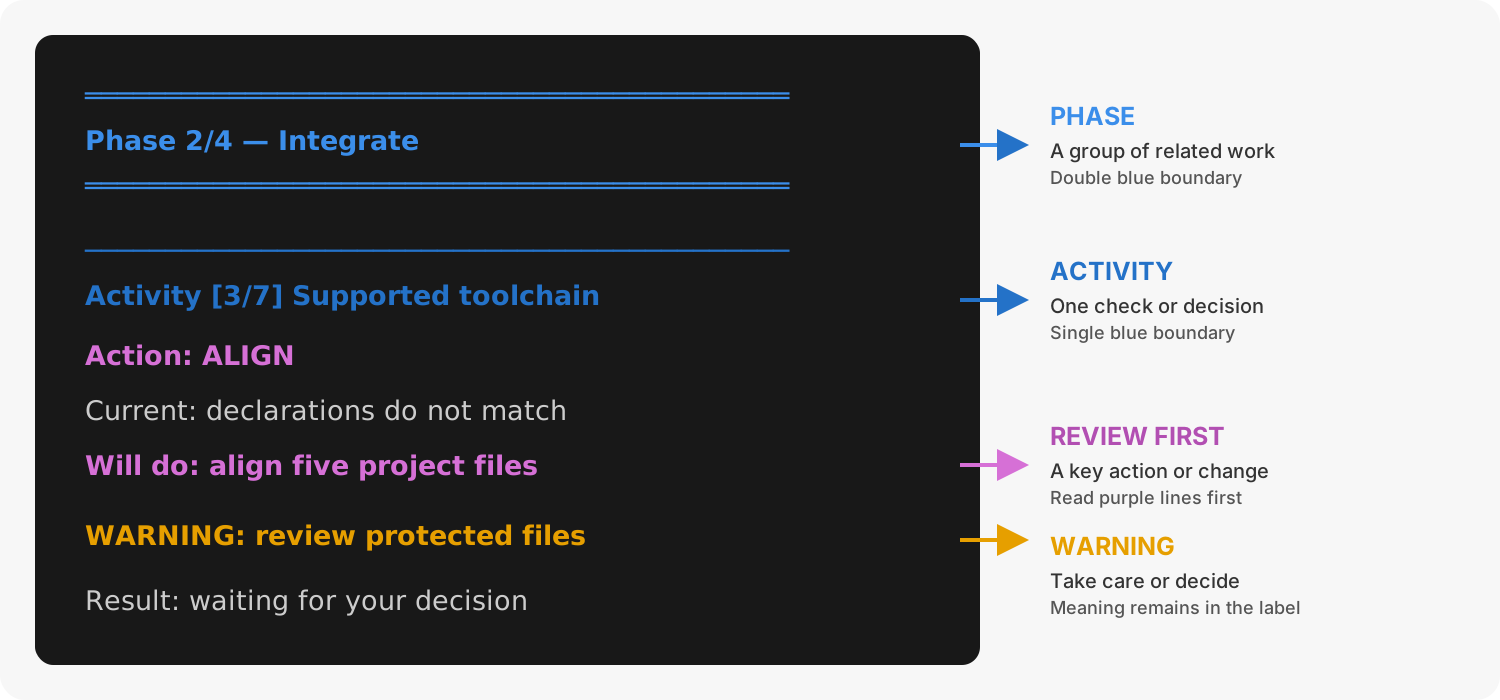
1. Bootstrap output structure
Phases and activities
The task guide uses stages and steps for the sequence followed by the reader. Bootstrap itself groups 20 independently checked activities into seven phases. Table 35.2 maps every activity to its phase and identifies whether Bootstrap can automate it.
2. Bootstrap activities grouped into phases
| Phase | # | Activity | Automated? |
|---|---|---|---|
| 1. Preflight | 1 | prodockit runs in an environment of its own | yes, after a step of your own |
| 2. Core tools | 2 | Visual Studio Code | yes, after a step of your own |
| 3 | Git, installed and configured | yes | |
| 3. Git and host | 4 | SSH keypair | yes, after a step of your own |
| 5 | SSH config points at the key | yes | |
| 6 | Key loaded into the ssh agent | yes, after a step of your own | |
| 7 | SSH key on the host | guide and verify | |
| 4. Project | 8 | Your own project on the host | guide and verify |
| 9 | Pages switched on | guide and verify | |
| 10 | Where the project comes from | a choice | |
| 11 | Project cloned | yes | |
| 12 | A history of your own | yes | |
| 13 | Clone pointed at your project | yes | |
| 14 | Commit identity in the project | yes | |
| 5. Build toolchain | 15 | Project environment, dependencies and Adoption component choices | yes |
| 6. Editor and project | 16 | VS Code extensions | yes |
| 17 | VS Code settings for the project | yes | |
| 18 | Citation style for the first build | yes | |
| 7. Publish | 19 | First commit pushed | yes, after a step of your own |
| 20 | Documentation site published | guide and verify |
Each activity checks observable evidence before proposing work. An applied activity is checked again before Bootstrap continues, and a failure stops later dependent activities from running.
Activity 15 installs the exact Prodockit release paired with a fresh template
clone. For an existing repository, its recorded prodockit>= version is a
historical minimum, not an exact pairing: Bootstrap offers the release running
the setup, keeps an already newer compatible project environment, and does not
change committed version declarations. Review those separately with pdk pins
or Template Sync. An explicit requirement that excludes the proposed release
stops the activity before pip changes the project environment.
Modes and activity states
A normal check and --dry-run make no changes. --apply shows and asks
about each outstanding activity before acting; --configure saves the
answers and stops. Destructive work requires an explicit answer rather than
being accepted by pressing Enter. Table 35.3 explains the
states that can appear beside an activity.
3. Bootstrap activity states
| State | Meaning |
|---|---|
ok |
The activity is set up correctly; a rerun leaves it alone. |
WARN |
It may be usable, but a compatibility fact could not be verified. |
MISS |
The required item is absent. |
WRONG |
An item exists but is not usable in its current state. |
? |
Bootstrap needs a configuration answer before it can decide. |
WAIT |
An earlier activity must complete first. |
Configuration
Bootstrap saves personal, host, and project choices in .pdkboot.toml in the
setup directory. It supports GitHub.com, GitLab.com, and the University of
Surrey GitLab. The source is normally the appropriate maintained template;
when an existing repository is supplied, Bootstrap clones that repository
without replacing its history.
Use --configure to review all answers or --config PATH to deliberately
use another file. The configuration can include a name, email, username, host,
namespace, project name, project directory, and optional source URL. It must
never contain a password, token, or SSH passphrase.
Effects and prompts
An applied run can install machine software, create or update a project environment, configure Git and SSH, clone a project, configure the editor, and publish the first site. It presents work as activities, warns before consequential changes, and asks where a decision is required. Rerunning it skips activities that already pass.
The configuration file contains personal and project choices. Bootstrap keeps it outside the generated project where possible and excludes it from Git.
Network use
Checks use local state where possible. Installation, host authentication, cloning, pushing, and publication can contact package services or the selected Git host. A dry run does not execute the reported installation commands.
Result
A successful check reports that all activities are set up. A blocking inspection, invalid configuration, declined required action, or failed applied activity is reported with the activity that needs attention.
Related commands
Use these commands for narrower project integration and maintenance tasks:
pdk adoptintegrates Prodockit into an existing document without Bootstrap's machine, repository, editor, or publishing setup.pdk diagchecks the resulting project and environment.pdk template-syncapplies later template changes.