pdk adopt
pdk adopt adds selected Prodockit components and the supported toolchain to
an existing Zensical document. Its final apply phase offers separately confirmed
site details and optional Git/remote setup. It does not configure SSH, editors
or Pages, and it never commits or pushes.
Before making changes, Adopt checks the project's root-level TOML and YAML files and YAML build workflows. TOML uses Python's TOML parser; YAML is parsed without executing configuration tags. If a file is invalid, it reports the file, line and column of the first syntax error and stops. Correct that error and rerun the same command; another syntax error may become visible after the first is fixed. Completed activities are retained and reassessed, not rolled back or blindly repeated. Existing and proposed TOML and YAML contents are also checked before writing. These are syntax checks, not proof that a hosting service will accept or run a workflow.
Use the Adopt task guide for the preparation and review workflow.
Build workflow protection
Adopt compares the SHA-256 hash of .github/workflows/docs.yml with a verified
Zensical starter from its upstream repository. An exact match can be updated
in place. Modified or unknown files are preserved, with proposed instructions
written to pdk.yml in the project root instead. Existing proposal files are
also preserved so rerunning Adopt does not overwrite review work.
For an existing .gitlab-ci.yml, Adopt writes .gitlab-pdk.yml. There is no
verified GitLab starter in the pinned Zensical source, so Adopt does not
overwrite GitLab pipelines. Both proposals are inactive until you manually
merge the relevant instructions into your build file. They cover website
building, not PDF generation. Missing build files are not created automatically.
Projects carrying a valid .prodockit-template revision stamp use a different
ownership path. Their GitHub and GitLab workflows come from the released
Prodockit template and are maintained by pdk template-sync; Adopt does not
replace them with generic Zensical proposals. If an inactive pdk.yml or
.gitlab-pdk.yml already exists from an earlier Adopt run, Diagnostics keeps
reporting manual review as pending until the proposal has been merged or
removed. Merely creating a proposal is not successful workflow integration.
See Stage 7b — Review the project changes for the manual merge and review steps.
Recover interrupted repository setup
If sign-in times out, completed installation work is retained. Follow the
printed sign-in command to start a fresh login, complete its browser prompts
promptly, then rerun pdk adopt --apply.
A hosting tool can report failure after creating a repository. Adopt checks the exact repository address and requested visibility once without retrying creation. If verified, it asks whether to finish the local connection. If it cannot verify both, it leaves the connection unchanged and asks you to check the hosting service. On a later run, answer Yes to the existing-repository question if the repository is already there. Existing origin remotes are never replaced, and no files are committed or pushed.
Synopsis
Use the assessment form first, then choose configuration, preview, or apply.
With no mode option, Adopt assesses the project and reports outstanding activities.
Working directory
Run Adopt from the root of the existing project, where its Zensical
configuration and .venv are located. Adopt has no project-path option because
its safety checks and changes are intentionally scoped to the current project.
If the current directory holds one or more project repositories, Adopt refuses to start and names them:
Error: C:\path\to\workspace holds projects rather than being one (report-student).
Open a terminal in the project you want adopted, or cd into it.
In another wrong directory, the first assessment reports Existing
documentation project — no Zensical configuration is here and tells you to
run the command from the directory containing the configuration. Stop there
and change directory; do not create a configuration merely to satisfy Adopt.
Options
Table 37.1 lists the available project-integration controls.
1. Adopt options
| Option | Behaviour |
|---|---|
--configure |
Choose optional components and save them in .prodockit-components.toml. |
-n, --dry-run |
Show activities, files, and changes without writing or installing. |
-a, --apply |
Apply required activities, asking before each change. |
--offline |
Use only the configured wheelhouse and validated native cache. |
--mermaid, --no-mermaid |
Select or omit Python Mermaid rendering. |
--maths, --no-maths |
Select or omit MathJax rendering. |
-v, --verbose |
Show progress before initial checks as well as the files and commands behind each activity summary; the last progress line identifies a stalled operation. |
-h, --help |
Show installed help and exit. |
Output
Figure 37.1 shows the output structure. Use section 28.1, Scan phases and activities for the complete explanation of the phase, activity, action, warning, and decision language:
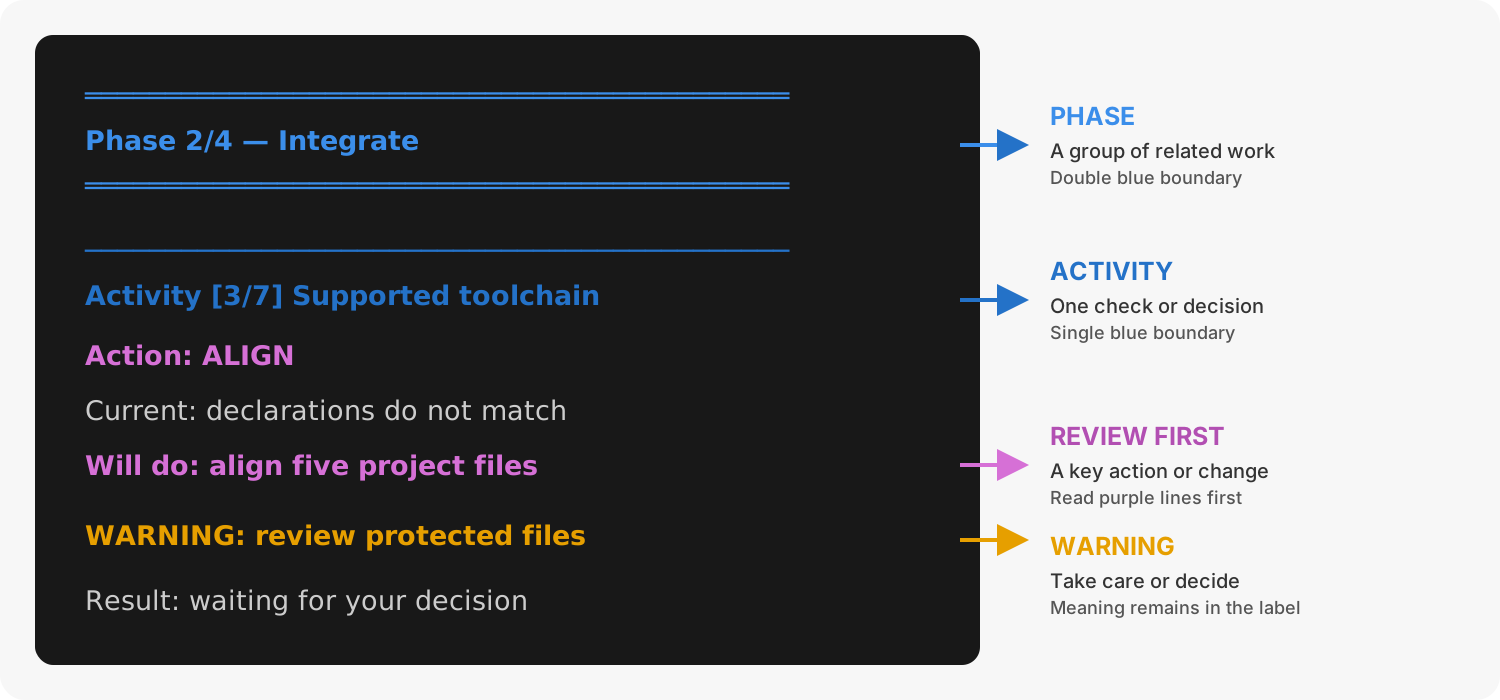
1. Adopt output structure
Effects and ownership
Adopt can install, upgrade, or downgrade software in the active project
environment to the combination supported by the installed Prodockit release.
It can also align version declarations, enable the standard extensions, install
the managed pdk.css and pdk.js files; create missing user-managed
extra.css and extra.js files without replacing their contents; record the
stylesheet and JavaScript cascades; save component choices; provision the
configured citation style when it is missing; and initialise selected
authoring configuration. PDF policy files, stylesheets, and renderers are
prepared by pdk pdf on first use; Adopt does not install Node, npm,
MSYS2, browsers, fonts, or PDF runtimes.
It cannot rewrite the parent terminal's environment: if the verification still
fails, an uppercase restart message includes the platform's activation command.
Adopt changes only the active Python environment and project-local files. It
does not install Node, npm, Pandoc, Pango, MSYS2, browsers, fonts, Git, SSH or
editors. pdk pdf prepares its project-local renderer caches; any reported
Node or macOS/Linux Pango prerequisite is installed separately with the
operating-system package manager.
Existing citation styles are preserved and checked for valid XML and the required CSL structure. An invalid file stops the citation-style activity; correct or restore the intended style, then rerun Adopt. Configuration checks and Diagnostics report the same problem before a build. An unknown custom filename receives manual guidance rather than a guessed download.
Downloading the supported style uses up to three attempts for temporary network failures, HTTP 429 or server errors. Partial downloads are discarded before retrying. Permanent errors such as HTTP 404 and invalid downloaded content are not retried. Only a validated file is installed and cached; offline mode never downloads a replacement.
.prodockit-components.toml belongs to the project. When it is missing, Adopt
detects existing project-local renderer installations, including partial installs.
Otherwise Mermaid and maths default off: Zensical's capable starter configuration
alone is not an author choice. Run pdk adopt --configure or use
explicit flags to select them. Template projects ship the component file with
both enabled.
Result
Adopt records its template-setting review separately from the checks that verify the project's current configuration and installed software.
Selected renderers and deferred preparation
Normal output explains why a change is needed and what Adopt will change.
Healthy checks are kept short. Run pdk adopt --dry-run --verbose to include
the file lists, installer commands and technical checks. Version-change details,
warnings and recovery instructions remain visible without --verbose.
After setup, run pdk diag and the displayed build command to check your
project. Setup being complete does not mean that the website has been built
or published.
Adopt stops if the project's managed declarations require a newer Prodockit than the command currently running. Activate the project's environment and install that release (or a compatible newer release) before trying again. This prevents an older Adopt from replacing files supplied by a newer template sync. Once Prodockit is compatible, Adopt can still upgrade or downgrade its dependencies to the supported combination.
Adopt records selected authoring components but does not create PDF policy
files or install their runtimes. Its final diagnostics label a clean missing project cache as deferred
first-use preparation, not as a failed adoption. Run pdk pdf to prepare only
the components the completed document uses, or pdk pdf --prepare COMPONENT
to force preparation before a build.
The first PDF build downloads and verifies project-local Pandoc, fonts,
Mermaid and MathJax as needed. Windows x64 also uses a project-local
WeasyPrint runtime. Mermaid needs no Node.js, npm or browser; MathJax currently
requires Node.js on PATH, but does not use npm or node_modules. On macOS
and Linux, system-backed WeasyPrint still needs the documented native
libraries. Adopt reports those genuine prerequisites without installing them.
Template settings and the review ledger
For a zensical.toml project, Adopt also checks the template for settings it has
not reviewed before. It reads the public template over HTTPS; Git, SSH and a
GitHub account are not required. Downloads use bounded requests: temporary
network failures are retried twice, with visible warnings and waits of two and
five seconds. Permanent HTTP errors and invalid
responses are not retried. A compatible cached snapshot can be used if the
download still fails. The configuration and version declaration come
from the same immutable commit. A template requiring a newer Prodockit release
is not used automatically. Known defaults still come from the installed
Prodockit release, not from the template's values.
GitHub rate limits can return HTTP 403 or 429. Adopt respects Retry-After
and the quota reset time, waiting up to ten seconds per retry. Longer waits
use a validated cache for the installed version, if available; otherwise Adopt
reports when to retry and suggests authenticated requests using GITHUB_TOKEN
or a local --template-config. Never paste a token into issue reports or logs.
An ordinary permission-denied 403 is not retried. This follows
GitHub's rate-limit guidance.
- Existing project values are preserved.
- Missing settings recognised by Adopt use its existing configuration rules.
- New, unrecognised settings are added as commented examples, never enabled just because they appeared in the template. Merge a reviewed example into its named table; do not create a duplicate table or key.
- Site identity, navigation, theme/branding, repository details, template-only
plugin configuration, custom template icons and PDF copyright are excluded.
template.cssis not introduced. Existing user-owned settings are not removed.
Adopt records each full setting path and its outcome in
.prodockit-adopt.toml: added, commented, excluded or already present.
This is separate from .prodockit-components.toml, which saves the Mermaid and
maths choices. Commit the review ledger if the team should share this history.
Later runs review only unseen template keys; changes to the value of an already
reviewed template key do not overwrite the project or its examples.
To reset the template review, delete only .prodockit-adopt.toml, then run
pdk adopt --dry-run and pdk adopt --apply. Existing active settings and
generated examples are preserved, and generated examples are not duplicated.
Deleting the ledger does not uninstall software or clear component choices.
The ledger controls template-setting import, not readiness checks. Required known configuration, software versions and renderer health are still checked; an installation record is never accepted as proof that a tool currently works. Configuration and ledger edits use TOML Kit to preserve comments and layout, with a separate TOML parse validation before atomic file replacement. The ledger is saved after the configuration, so an interrupted write can be retried safely.
Offline or locally supplied template
A successful settings application caches the downloaded snapshot for the
installed Prodockit version. --offline uses that cache without contacting
GitHub. A failed online lookup can also use this cache; the command identifies
the cached source. If neither a usable online snapshot nor cache is available,
Adopt stops with recovery guidance before starting installation activities.
You can supply a compatible template configuration directly, including offline:
pdk adopt --dry-run --template-config /path/to/template/zensical.toml
pdk adopt --apply --template-config /path/to/template/zensical.toml
Choose a configuration compatible with your installed release when using this explicit override. A local override is not saved into the global download cache. Assessment/dry-run does not write the project, ledger or snapshot cache. The template ledger currently applies to TOML projects; existing YAML adoption continues to use its standard configuration handlers.
Completion checks
Assessment and dry-run modes report the number of activities needing work. Apply mode reassesses the resulting configuration and names the strict local build command. It reports an incomplete result if required work remains; configuration verification does not replace a successful build. A blocking project or environment check stops the integration.
Adopt is independent of Bootstrap. If a virtual environment is active and the
project has its own .venv, they must match; otherwise Adopt stops before
configuration or package changes. An intentionally named environment is accepted
when the project has no .venv. With no active virtual environment, Adopt warns
that package changes will affect the running Python installation. Create and
activate an environment first unless that is intentional.
Related commands
Use these commands before or after Adopt for their separate responsibilities:
pdk diagreports when Adopt integration remains and verifies the result.pdk pinsmakes an explicit version-selection decision across declarations.pdk template-syncinvokes Adopt as a prerequisite but separately owns template files and review branches.