Version pinning and drift
A documentation build has more inputs than its own source, which creates
dependency drift when declared or installed versions diverge. zensical
renders the site, weasyprint lays out the PDF, and both are ordinary
Python packages that resolve to whatever is newest unless you say
otherwise.
That matters more than it first appears, because the way an upgrade shows up here is not a failed build. It is a published document that quietly differs from the one you reviewed.
What this looks like in practice
Zensical 0.0.52 bumped its bundled Font Awesome from 7.2.0 to 7.3.1, which redrew the GitHub brand icon. Every page of this project's own website changed. The PDF was byte-identical. Nothing failed, nothing was committed, and the site simply looked slightly different the next time it deployed.
A weasyprint upgrade is sharper still: it decides pagination, so a
release that lays out one paragraph differently shifts every page
number after it - and those page numbers are content, resolved into
the back-of-book index and the table of
contents.
The prodockit pins command supports two halves that only
work together:
- Pin the build inputs, so output changes when someone decides it should.
- Watch for newer releases, so pinning does not mean going quietly stale.
Pins uses Prodockit's shared field and decision language, but presents its short package inventory without the full phase-and-activity frame.
Figure 17.1 shows the two controls in one cycle. The top row finds declarations or shared files that disagree and aligns the release inputs. The lower row compares the pinned output with newer dependencies and reports the difference for a maintainer to accept or reject.
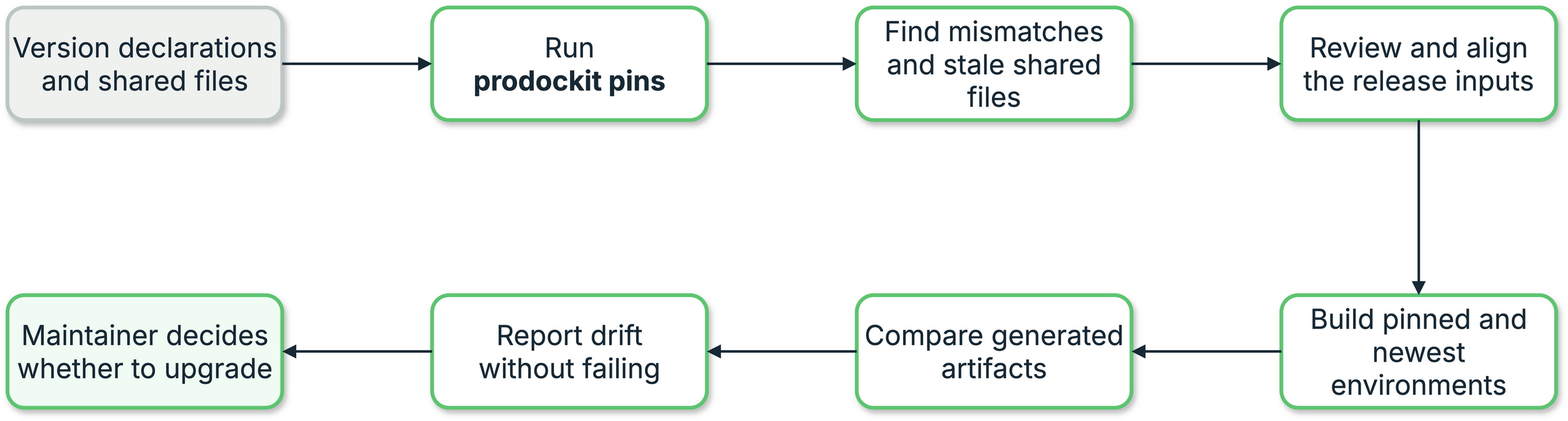
1. Version pinning and drift workflow
Maintain a dependency safely
Check agreement first, inspect newer versions separately, and update only after the resulting output difference has been reviewed.
-
Check that the repository agrees with itself
This does not contact PyPI. It answers the pull-request question: do the version declarations already present in
pyproject.tomland the workflows agree? It is the form used byci.yml, because a new upstream release should not make an unrelated pull request fail. -
Review drift information
The scheduled
drift.ymlworkflow asks the separate maintenance question: are newer releases available, and would they change the website or PDF? Read the issue it opens or run the workflow manually before selecting versions.For a quick inventory from a terminal:
This reports the newest releases from PyPI, but offers the complete version combination tested by the installed Prodockit release as its defaults. It does not compare rendered artifacts for you.
Restore the supported software combination
If a build starts failing, its output changes unexpectedly, or dependency versions have drifted, run
prodockit pins. Review the inventory, then press Enter at each prompt to bring every declared build input back to the combination supported by the installed Prodockit release. This covers Zensical, WeasyPrint, Prodockit, Markdown, PyMdown Extensions, Pandoc, and Python wherever the project declares them.A newer version shown by PyPI is information, not the default. Type a different version only when you intend to test that combination, or use
--latestto opt into the newest PyPI releases explicitly. -
Move every declaration together
Set an reviewed version explicitly:
The tool preserves the role of each declaration: a library floor remains a floor and a publishing workflow's exact pin remains exact.
-
Rebuild in publishing order
Compare the website and PDF with the pinned baseline recorded by the drift issue. Review pagination, generated indexes, diagrams, code blocks, and icons—not only whether the commands returned zero.
-
Confirm consistency before committing
The final offline check prevents a partial version bump from reaching the pull request. The pull request then runs the same consistency gate in
ci.yml.
Where a version gets declared
Pinning creates its own problem: the same version ends up written in several files at once, and nothing keeps them in step.
Table 17.1 identifies every file in which a build-input version can be declared.
1. Where a version gets declared
| File | Typically declares | Why that form |
|---|---|---|
pyproject.toml |
zensical>=0.0.57 |
A floor. An exact pin in a library's metadata propagates to every consumer and conflicts with any project needing a different Zensical. |
| CI docs/build job | zensical==0.0.57 |
An exact pin. The site and PDF are artifacts; they should change deliberately. |
| Ordinary CI test job | Package dependency floors | A latest-version canary; resolved versions can advance independently of publishing pins. |
| Drift job | both, exactly | The baseline it compares the newest release against. |
Both forms are correct in their own place. What is not correct is them disagreeing, which is easy to do by hand and invisible when it happens.
prodockit pins
Reads every declaration across all of those files, shows what is currently set against what is newest on PyPI, and moves them together.
zensical
pyproject.toml:34 zensical>=0.0.53
.github/workflows/docs.yml:164 zensical==0.0.53
.github/workflows/drift.yml:69 zensical==0.0.53
newest on PyPI: 0.0.60 <- newer available
tested with installed prodockit 0.58.0: 0.0.59 <- interactive default
weasyprint
.github/workflows/ci.yml:59 weasyprint==69.0
.github/workflows/docs.yml:164 weasyprint==69.0
newest on PyPI: 70.0 <- newer available
tested with installed prodockit 0.58.0: 69.0 <- interactive default
markdown
pyproject.toml:25 markdown>=3.10.3
.github/workflows/docs.yml:164 markdown==3.10.3
.github/workflows/drift.yml:69 markdown==3.10.3
newest on PyPI: 3.10.3
tested with installed prodockit 0.58.0: 3.10.3 <- interactive default
pymdown-extensions
.github/workflows/docs.yml:164 pymdown-extensions==11.0.2
.github/workflows/drift.yml:69 pymdown-extensions==11.0.2
newest on PyPI: 11.0.2
tested with installed prodockit 0.58.0: 11.0.2 <- interactive default
zensical: version to set [0.0.59]:
Markdown and pymdown-extensions are in that list even though nothing
installs them directly - they arrive under Zensical, which declares only
floors for them. See the limitations below for why
pinning Zensical alone left them free to move.
Press Enter to take the version tested by the installed Prodockit release, or type another version deliberately. Each site keeps its own operator - the floor stays a floor, the pins stay pinned - so one answer updates every file correctly. The supported defaults are carried inside the installed wheel, so restoring them does not depend on the template or on PyPI being available.
The pdk pins command reference lists every reporting,
write, network, and package-selection option. This task guide concentrates on
choosing and validating a version change.
Keep shared files with the pinned release
Some documentation assets belong to the Prodockit release rather than to one
site. The managed pdk.css and pdk-pdf.css files are two of them:
extensions, template and user-guide use identical defaults, then select
site-specific behaviour through configuration switches. Author-owned
extra.css and print.css are deliberately absent from this manifest and
remain free for local customisation. Copying managed files by hand allowed one
site to retain a duplicated older rule without any build failing.
Prodockit therefore carries the canonical file in its wheel. A repository opts
in with .prodockit-shared-files.toml:
version = 1
[[files]]
source = "pdk.css"
target = "docs/stylesheets/pdk.css"
[[files]]
source = "pdk-pdf.css"
target = "docs/stylesheets/pdk-pdf.css"
Check without writing:
Restore a missing or different file, then review it:
When the manifest is present, prodockit pins --check --offline performs the
same content check after checking version declarations. This makes the normal
CI gate protect the versions and managed files supplied by that installed
version without treating author-owned extra.css or print.css as drift. It
reads only the installed wheel and local project: no sibling checkout, GitHub
branch, checksum list or network request is involved.
Use prodockit shared-files --verbose when investigating a mismatch; it adds
the expected and actual SHA-256 values to the ordinary author-facing report.
--set is the unattended form, so it suppresses the prompt for every
package, not only the one it names:
pyproject.toml:34 zensical>=0.0.52 -> zensical>=0.0.53
.github/workflows/docs.yml:136 zensical==0.0.52 -> zensical==0.0.53
Left untouched (no version given): weasyprint
Updated 2 declaration(s). Rebuild and diff before committing.
A package it was not given is reported and its files are not opened - name
it with its own --set to move it, or leave it where it is. That is what
makes the command safe in a script: it can neither hang on a prompt nor
half-finish because one appeared.
--check is the one to put in CI:
It fails when a package is behind PyPI or when the files disagree with each other - the second being the failure that pinning across several files invites.
Add --offline when it gates a pull request
Those two failures belong in different places. Files disagreeing is a property of the repository: a real mistake, introduced by a commit, fixable by its author. Behind PyPI is a property of the world, and turns every open pull request red the day upstream ships a release, with nothing in the branch having changed and nothing the author can do about it. A gate that fails for reasons outside the contributor's control is one people learn to ignore.
--offline keeps the first check and drops the second, and needs no
network. Leave "is there something newer" to a
drift job, which reports on a schedule
rather than failing a build. This project's own ci.yml runs the
offline form for exactly this reason.
What it scans
Both CI hosts, so the same command works either way:
pyproject.toml,setup.cfg.python-version— the exact Python used for artifact builds.github/workflows/*.yml— GitHub Actions.gitlab-ci.ymland.gitlab/**/*.yml— GitLab CIrequirements*.txt,constraints*.txtat the project root
Build output and virtualenvs (site/, public/, .venv/,
node_modules/, …) are skipped, so a stale copy of a workflow inside one
is not mistaken for a declaration.
Five shapes of declaration are recognised, because a build input is not always a pip package:
Table 17.2 lists the declaration forms recognised by the drift scanner.
2. What it scans
| Shape | Example | Where |
|---|---|---|
| pip specifier | zensical==0.0.52, zensical>=0.0.52 |
anywhere |
| runner label | runs-on: ubuntu-24.04 |
GitHub Actions |
| image tag | image: python:3.14 |
GitLab CI, or any container |
| CI variable | PANDOC_VERSION: "3.10.1" |
a GitHub env: block, a GitLab variables: block |
| version file | 3.14 |
.python-version |
Why Python is managed without a release check
.python-version gives local tooling and non-matrix CI jobs one exact
build interpreter. A GitLab image: python:... declaration is checked
against the same value and moves with it when you run, for example,
prodockit pins --set python=3.14.
Python is not looked up on PyPI: its release lifecycle is not represented
by the unrelated package with that name. pins checks that the repository
agrees with itself; choosing a newer Python remains a deliberate project
decision. A library's supported-version test matrix is separate and is not
rewritten from .python-version.
Why prodockit is managed by default
It was not, for a long time, and the omission had exactly the
consequence the managed set exists to prevent. prodockit-template
pinned prodockit==0.35.0 and drifted two releases behind with
nothing noticing, because the one command that looks at pins was not
looking at this one - moving it needed -p prodockit typed by hand,
which is the step nobody remembers
(prodockit-template#173).
It belongs there on the merits too: prodockit renders the PDF and generates the back-of-book index, so its version changes a project's published output as directly as Zensical's does.
Including it is safe even in prodockit's own repository, where the
name appears in pyproject.toml as the project's identity rather
than as a dependency. The specifier pattern requires a version
operator after the name, so name = "prodockit" and the adjacent
version = "..." are not declarations - without that, the command
would offer to rewrite the release number of the package being built.
Why pandoc is managed by default
Pandoc is not a Python package, so it never appears as a pip specifier
- it is a build-provided binary, pinned as a <PACKAGE>_VERSION
variable the way prodockit pdf's publishing workflow does. It earns a
place in the default set for the same reason Zensical
and WeasyPrint do: pandoc is not always compatible with itself across
releases, and one of its changes broke every fenced code block in this
project's own PDF while the build kept reporting success.
The CI variable's name keeps its case on rewrite - PANDOC_VERSION,
not pandoc_VERSION - since a workflow step reading
${{ env.PANDOC_VERSION }} needs the name unchanged,
only the value.
Pandoc version drift
Distribution Pandoc packages can lag several major versions behind upstream. Ubuntu 24.04, for example, supplies an older release than the one this repository currently tests and publishes with. Installing the distribution package locally while CI downloads a current release means the two builds can parse identical HTML differently.
That happened here when one Pandoc release accepted highlighted
<pre><code> content that a newer release interpreted differently. Every
fenced code block reflowed as ordinary justified prose in one environment,
while the other environment continued publishing a correct PDF. Both builds
reported success.
Pin Pandoc as a PANDOC_VERSION workflow variable and move it through
prodockit pins, then compare complete PDF and website artifacts before and
after the change. Pinning does not prevent incompatibility; it makes the
change arrive in a reviewed commit instead of with an unannounced runner
update.
Only versioned declarations are found
A dependency installed with no version at all is not a declaration
site, so it will not appear - pin it once by hand and the tool manages
it from then on. The same applies to runs-on: ubuntu-latest, which
names no version to move.
Watching for drift
Pinning trades one risk for another: nothing tells you a newer release exists, or what it would do to your output.
The check worth running is not "is there a new version" - PyPI can answer that - but "would taking it change what we publish?" That needs a real build, twice.
The shape is the same on either host:
- Build the docs with the pinned versions. Keep the result.
- Upgrade to the newest and build again.
- Diff the two, byte for byte.
- Run your built-output checks against the newer build.
- Report - do not fail.
Both builds run in the same job, so pandoc, Chrome, fonts and the runner image are identical between them and any difference is attributable to the upgraded packages alone.
Two things make or break this
Build order. zensical build copies the PDF into the site
directory, so it must run after prodockit pdf. Reversed, the
copied PDF lags a generation and every comparison is a false positive
that looks exactly like nondeterminism.
Determinism. The diff only means something if identical inputs give identical output. Verify that first - two builds of the same version should produce a byte-identical site and PDF. They do for this project; confirm it for yours before trusting a diff.
Reporting, not failing
A newer release is information, not a broken build. A scheduled job that goes red every week trains everyone to ignore it, so open an issue instead - and keep one open at a time, updating it in place rather than filing a fresh one every Monday until somebody acts.
GitHub Actions
This project ships drift.yml
doing exactly this. The essentials:
name: Dependency drift
on:
schedule:
- cron: "0 6 * * 1" # Mondays, 06:00 UTC
workflow_dispatch:
permissions:
contents: read
issues: write # needed to open the issue
jobs:
drift:
runs-on: ubuntu-latest
steps:
# ... same build tooling as your docs job ...
- name: Build with the pinned versions
run: |
pip install -e ".[testing]" "zensical==0.0.57" "weasyprint==69.0" "Markdown==3.10.3" "pymdown-extensions==11.0.2"
zensical build --clean --strict # Build the site first ...
prodockit pdf # ... then consume it for the PDF
cp -R site /tmp/pinned-site
cp docs/site_documentation.pdf /tmp/pinned.pdf
- name: Build with the newest versions
run: |
pip install -qU zensical weasyprint
zensical build --clean --strict
prodockit pdf
- name: Compare
env:
GH_TOKEN: ${{ github.token }}
run: |
cmp -s /tmp/pinned.pdf docs/site_documentation.pdf \
&& echo "PDF identical" || echo "PDF differs"
diff -rq /tmp/pinned-site site | wc -l
# ... then gh issue create / gh issue comment
GitLab CI
The same job, with GitLab's own scheduling and API. Add a
pipeline schedule
running weekly, and a project access token with the api scope exposed as
DRIFT_TOKEN so the job can open an issue.
drift:
image: python:3.14
rules:
# Only on the schedule - never on a normal push pipeline.
- if: $CI_PIPELINE_SOURCE == "schedule"
before_script:
- apt-get update && apt-get install -y pandoc libpango-1.0-0 libpangoft2-1.0-0 libharfbuzz-subset0 jq curl
script:
- pip install -e ".[testing]" "zensical==0.0.57" "weasyprint==69.0" "Markdown==3.10.3" "pymdown-extensions==11.0.2"
- zensical build --clean --strict # Build the site first ...
- prodockit pdf # ... then consume it for the PDF
- cp -R site /tmp/pinned-site && cp docs/site_documentation.pdf /tmp/pinned.pdf
- pip install -qU zensical weasyprint
- PINNED=$(pip show zensical | awk '/^Version:/{print $2}')
- zensical build --clean --strict
- prodockit pdf
- LATEST=$(pip show zensical | awk '/^Version:/{print $2}')
- |
if [ "$PINNED" = "$LATEST" ]; then
echo "Pins are current."; exit 0
fi
CHANGED=$(diff -rq /tmp/pinned-site site | wc -l)
cmp -s /tmp/pinned.pdf docs/site_documentation.pdf && PDF=identical || PDF=differs
# One open issue at a time.
EXISTING=$(curl -sf --header "PRIVATE-TOKEN: $DRIFT_TOKEN" \
"$CI_API_V4_URL/projects/$CI_PROJECT_ID/issues?state=opened&search=Dependency+drift" \
| jq -r '.[0].iid // empty')
BODY="zensical $PINNED -> $LATEST. PDF: $PDF. Website: $CHANGED files differ."
if [ -n "$EXISTING" ]; then
curl -sf --request POST --header "PRIVATE-TOKEN: $DRIFT_TOKEN" \
--data-urlencode "body=$BODY" \
"$CI_API_V4_URL/projects/$CI_PROJECT_ID/issues/$EXISTING/notes" > /dev/null
else
curl -sf --request POST --header "PRIVATE-TOKEN: $DRIFT_TOKEN" \
--data-urlencode "title=Dependency drift: newer build inputs than the docs pins" \
--data-urlencode "description=$BODY" \
"$CI_API_V4_URL/projects/$CI_PROJECT_ID/issues" > /dev/null
fi
allow_failure: true
allow_failure: true keeps the pipeline green: the job's purpose is the
issue it opens, not its own exit status.
The input pip cannot reach
prodockit pins manages Python packages. The CI runner image is the other
half, and nothing in pyproject.toml or a workflow's pip install line
touches it:
pandoccomes from the image's own package archive. Distribution packages lag upstream far enough that some Markdown edge cases parse differently—see Pandoc version drift.- Fonts the PDF embeds (
fonts-inter,fonts-jetbrains-mono). - Chrome, which rasterises Mermaid diagrams.
On runs-on: ubuntu-latest all three move the day the label migrates to a
new LTS, with nothing committed - the same silent change the package pins
exist to prevent, one layer down. Naming the image freezes them together:
GitLab's equivalent is the job image:, which most projects already pin by
habit - python:3.14 rather than python:latest.
prodockit pins manages both, so the image is inventoried and moved the
same way as everything else. Python is in the default managed set; -p
narrows a run to one named input:
prodockit pins -p ubuntu # runs-on: ubuntu-24.04, across every workflow
prodockit pins -p python # .python-version and image: python:3.14
ubuntu
.github/workflows/ci.yml:11 ubuntu-24.04
.github/workflows/docs.yml:69 ubuntu-24.04
.github/workflows/drift.yml:36 ubuntu-24.04
.github/workflows/publish.yml:10 ubuntu-24.04
not on PyPI - set the version yourself
ubuntu: version to set [24.04]:
There is no suggested version for these: PyPI has nothing to say about a runner image, and asking it for "ubuntu" would at best miss and at worst find an unrelated package of that name and propose a nonsense upgrade. The default is what is currently set, so Enter is a no-op and you type the new one deliberately - which suits a change you make once every couple of years.
--check still applies, and catches the failure that matters here: some
jobs left on the old image after a partial migration.
What this costs
ubuntu-latest already is 24.04 today, so pinning changes nothing
immediately. It takes effect at the migration - which is the point.
Pinned images are retired roughly a year after the following LTS, and the job then fails outright rather than drifting. That is the better failure: loud, and at a time you choose. Treat a retirement notice as the prompt to rebuild, diff, and move up deliberately.
Taking an upgrade
When drift reports something worth having, use the complete maintenance flow above. The short command sequence is:
prodockit pins --set zensical=0.0.57
zensical build --clean --strict
prodockit pdf
pytest
prodockit pins --check --offline
Substitute the package and reviewed version reported by drift. Then diff the built output against the previous version before committing. That is the step the whole arrangement exists to make possible: seeing what an upgrade does to your document before your readers do.
Limitations and workarounds
See Implementation limitations for the general list. Specific to pinning:
- A floor still floats.
zensical>=0.0.57inpyproject.tomlrecords a version; it does not control one. Only the exact pin in the build job does. Both exist deliberately - see Table 17.1. - A pinned package's own dependencies float too, which is the sharper
version of the same trap: pinning a direct dependency exactly does
nothing for the transitive ones underneath it, because their versions
come from floors in its metadata. Zensical is pinned exactly here, and
still declares only floors for
Markdownandpymdown-extensions- the two packages that actually turn every page into HTML. A build pinning Zensical alone therefore rendered with whatever those two resolved to on the morning it ran. Both are now pinned alongside it, and both are managed byprodockit pins(#178). If your project pins something whose rendering you depend on, check what it pulls in:pip show <package>lists its requirements, and a floor there is a version you are not controlling. - Only pip packages are watched.
pandocand Chrome arrive from the runner image, so a drift job that installs both builds in one job cannot see them change between weeks. Pinning the image is the lever for those - see below. - Comments are not scanned. A version specifier written in prose -
explaining why something is pinned, say - is deliberately not treated as
a declaration, so it is neither reported nor rewritten by
--set. Only the part of a line before a#is read (#184); a trailing comment after a real declaration still leaves that declaration findable. - The supported defaults work offline.
prodockit pinsonly needs network to report newer PyPI releases or use--latest. The combination tested by the installed Prodockit release is carried in its wheel, so--offlinestill offers those versions interactively.
Zensical release qualification
Use .github/workflows/zensical-compatibility.yml for an isolated Zensical
comparison. Ordinary ci.yml resolves library dependency floors and is a
latest-version canary; docs.yml pins publishing inputs. The older drift job
upgrades several dependencies together and cannot attribute a change to
Zensical alone.
The compatibility workflow accepts exact baseline and candidate releases.
Its configuration matrix covers Python 3.10–3.14 on Ubuntu, macOS and Windows.
The Windows macro fixture uses an extended-length include path. A manual run
with full enabled additionally builds both complete extensions documents,
both complete template documents and both template source bundles on Ubuntu.
It tests browser redirect navigation and feature PDFs separately. Choose an
explicit template commit for repeatable qualification; the resolved commit
and working-tree state are recorded in the evidence.
Run the same gate locally from a checkout with the normal PDF prerequisites:
python tools/zensical_compatibility.py pair \
  --baseline 0.0.63 --candidate 0.0.64 \
  --output /tmp/zensical-config-review

python tools/zensical_compatibility.py pair \
  --baseline 0.0.63 --candidate 0.0.64 --full \
  --template ../prodockit-template \
  --browser-script tools/compatibility/redirect_browser.cjs \
  --output /tmp/zensical-full-review
Use a fresh output directory. The runner creates two private virtual environments,
freezes the candidate dependencies, and changes only Zensical in the historical baseline.
The baseline installs the same local Prodockit build without dependency resolution
so the new supported floor does not prevent testing the previous release. All
other dependencies retain their frozen versions; the report rejects any other
dependency difference. The baseline may record only the exact Prodockit/Zensical
metadata-floor conflict as an expected diagnostic failure; any other diagnostic
failure still blocks qualification. Candidate diagnostics receive no exemption.
Only Zensical declarations in disposable baseline projects are aligned to the
historical version under test; runtime source and documentation stay unchanged.
It never installs into the invoking environment. Complete builds use disposable
Git copies and the same template citation-style bytes; supply
harvard-cite-them-right.csl in the template checkout as its publishing workflow
does. Node, Chrome, Pandoc and fonts must already be available for full builds.
Read analysis.md, result.json, command logs and the comparison JSON artifacts.
Configuration checks report pass/fail, strict expected failure, unsupported
feature and not-run counts separately. JUnit reports retain executed, passed,
failed, error and skipped suite counts. Configuration-only results do not qualify
an upgrade. Build failure or incomplete output fails the gate. Byte differences
are recorded for review, not automatically classified as regressions.
All pages of each generated PDF are compared for dimensions, text, raster output at 144 dpi, bookmarks and link annotations. Navigation coverage and published PDF copies are checked independently. A short feature-fixture PDF never substitutes for the full extensions/template documents. Website redirect success does not imply JavaScript aliases work inside a PDF.
Known limitations
Zensical 0.0.61 rejects Mike's documented version_selector option. The gate
retains the real CLI reproduction as a strict expected failure for exactly that
version and diagnostic. An unrelated failure still fails; an unexpected pass
also fails so the exception must be reviewed. This is an upstream limitation,
not a passing Prodockit test. See
the compatibility issue.
New candidate versions are not automatically exempted.
The full link audit also exposes existing defects such as absolute checkout paths in PDFs. A defect present on both releases is not a new Zensical regression, but it still prevents a clean full qualification until repaired. No result from one local OS/Python run substitutes for the workflow matrix.