Extension integration
The Authoring reference explains the Markdown syntax and zensical.toml
options. This page explains what happens after an author uses them. Zensical
passes each Markdown page through Python-Markdown, where the prodockit and
PyMdown extensions add their features. Zensical then finishes the website,
including its macros and website styles.
The PDF is not built from the Markdown a second time. Prodockit takes the page HTML already created by Zensical, applies the PDF processing and styles, and combines the pages into one document. Figure 48.1 shows the website path across the top and the PDF path beneath it. The shared point between them is Zensical's generated page HTML.
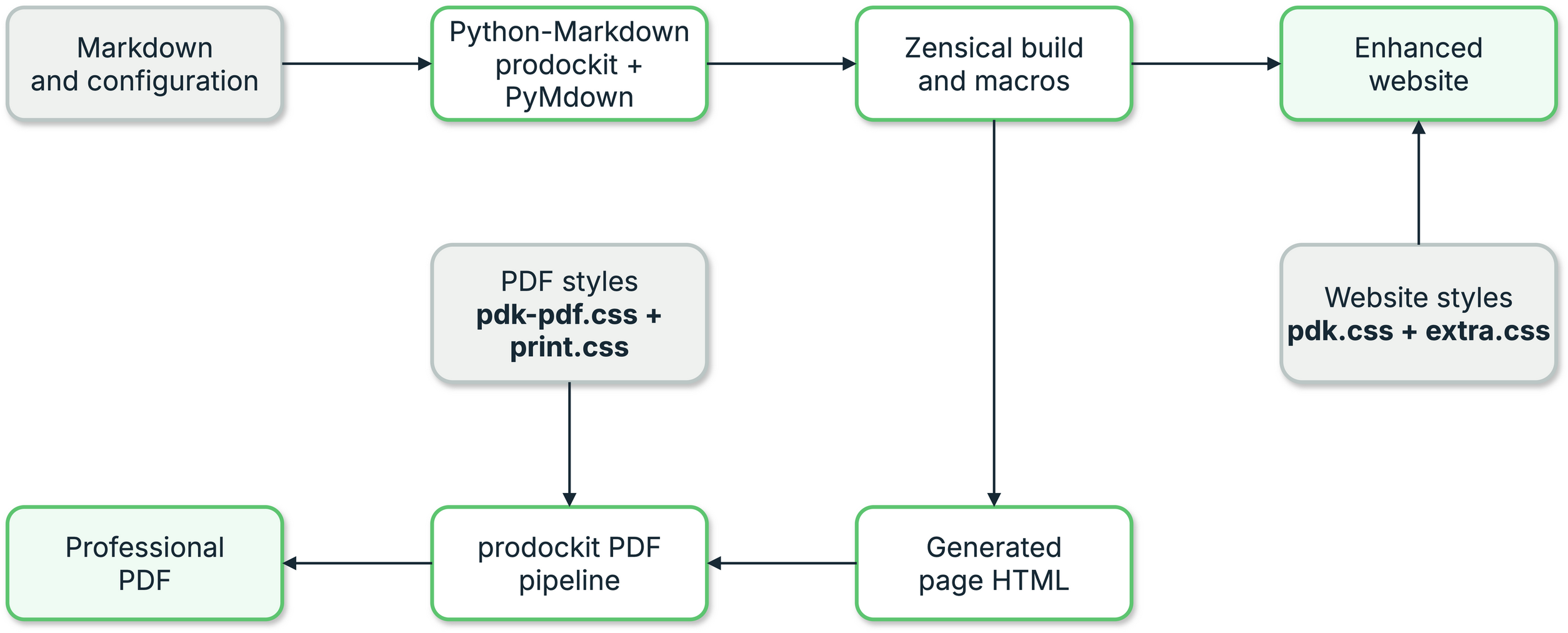
1. Extension integration flow
Share definitions across pages
Headings, references, citations, and glossary terms need build-wide state:
Table 48.1 identifies the build-wide state shared by each extension and the definitions stored in it.
Zensical creates a fresh Python-Markdown instance per page. Prodockit detects
the Zensical page context, derives a source path, and shares the appropriate
registry across the build. A pre-scan reads definitions from every navigation
page before conversion so a page can refer forward to a definition rendered
later.
The target and the reference may appear in either order and in different Markdown files. Prodockit therefore collects labels from every page before it resolves any reference. Figure 48.2 shows both files entering that shared collection step, followed by one resolution step that produces the appropriate website link and PDF page reference.
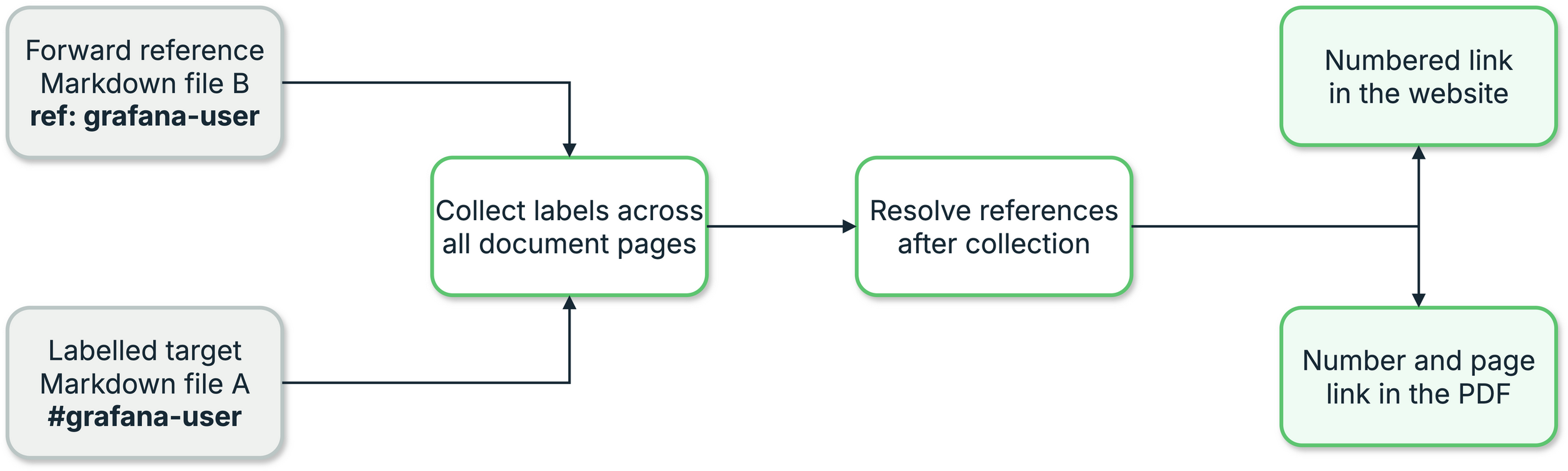
2. Cross-file reference resolution
Outside Zensical, the caller supplies the registry and source explicitly:
import markdown
from prodockit.headings import HeadingsExtension
from prodockit.refs import RefsExtension
from prodockit.util import IdRegistry

registry = IdRegistry()

for path, text in pages:
    html = markdown.markdown(
        text,
        extensions=[
            HeadingsExtension(registry=registry, source=path),
            RefsExtension(registry=registry, source=path),
        ],
    )
The equivalent constructors accept CitationRegistry and GlossaryRegistry.
A manually shared registry raises DuplicateIdError for a collision between
different sources. Zensical's best-effort automatic integration warns and
keeps the first registration, so public guides require explicit ids for
repeated headings such as “Overview”.
prodockit.headings.prescan() exposes the same continuous-numbering scan to
template macros and other build tooling. It returns page-keyed starting counts
and appendix letters while a Zensical build is active.
Delegate bibliography formatting
prodockit.bibliography does not implement CSL sorting, localisation, or
disambiguation. It passes each distinct citation or reference-list request to
pandoc --citeproc with the configured .bib and .csl files, then memoizes
the formatted HTML for the rest of the build.
Figure 48.3 follows one formatting request from the
Markdown, BibTeX, and CSL inputs through prodockit.bibliography to Pandoc.
The formatted HTML returned by Pandoc is reused in both the website and PDF,
which keeps their citation presentation consistent.
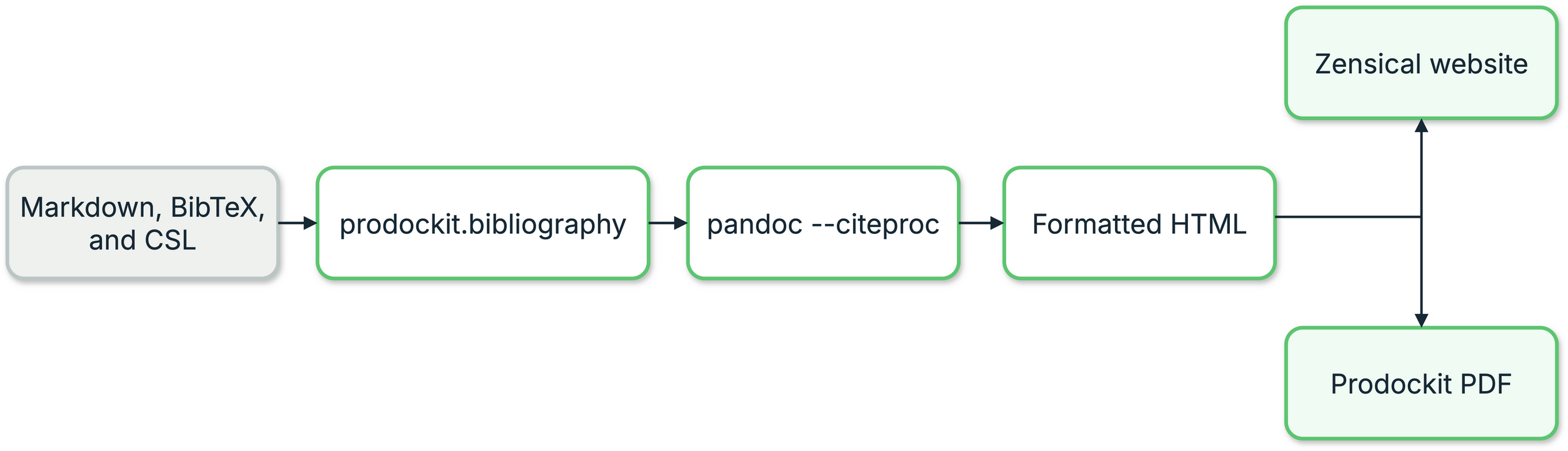
3. Bibliography formatting pipeline
Pandoc formats only the requested citation or list. Zensical still renders the surrounding page.
Generate an index after layout
Index markers exist before pagination, but their page numbers do not. The PDF
pipeline therefore uses two PDF passes: the first locates every marked term;
the second adds the sorted, deduplicated index with resolved page numbers.
prodockit.pdf.index owns extraction and index construction.
Preserve website and PDF block behaviour
prodockit.steps follows the PyMdown Blocks API. Its start option emits both
HTML <ol start="9"> and CSS counter-reset: list-item 8. Browsers honour the
HTML attribute while WeasyPrint needs the CSS counter-reset. Removing either
representation makes continued numbering disagree between outputs.
Tree and steps blocks expose stable class names for author styles. Their parser and output details can change only with matching website, PDF, and built-output tests.
Preserve table layout contracts
prodockit.tables runs after Python-Markdown's table extension and changes the
generated HTML. Widths create a <colgroup> and mark the table with
.prodockit-table-sized; compact tables use .prodockit-table-compact.
Additional header rows move into <thead>, span placeholders are removed, and
rotated headings use a transform because WeasyPrint does not reliably support
writing-mode.
These transformations have consequences outside the extension. Zensical's
theme styles many tables through .md-typeset table:not([class]), so adding a
class means the project stylesheet must restore the normal border, padding,
background, and dark-mode colours. Rotation also needs an explicit width
because CSS transforms do not participate in layout. Keep website and PDF
fixture coverage together when changing any of these contracts.
Maintain the stylesheet contract
The public Stylesheets page explains the author-facing cascade. Contributors must preserve the implementation behind it:
pdk.csssupplies managed component defaults shared by the website and PDF.pdk-pdf.csssupplies managed PDF-only presentation defaults.extra.cssandprint.cssbelong to the document author. They must never be packaged as shared files or replaced bytemplate-sync.- The effective order remains renderer or theme foundations →
pdk.css→extra.css→pdk-pdf.css→print.css. The PDF's final structural guard may protect the page canvas, but must not become a second presentation stylesheet that authors cannot override.
The canonical managed files live in docs/stylesheets/. Hatch's
force-include mappings package them as prodockit/assets/ resources in the
wheel, while src/prodockit/shared_files.py exposes only those finite resource
names to pins and shared-files. Keep those mappings and their tests aligned
when adding or renaming a managed file.
The stylesheet delivery code map lists every source, packaging, update, rendering, and test boundary involved.
A managed stylesheet change is not complete until the same release has been
cascaded to prodockit-template and prodockit-userguide. Check both
repositories with prodockit pins --check; do not copy extra.css or
print.css between them because those files intentionally hold each site's
own choices.
Preserve inline index content
The index inline processor runs early enough to retain nested Markdown such as
emphasis, code, and links inside \\index{...}. The PDF stage later uses
BeautifulSoup text extraction so the filing term is plain text even when the
visible term contains nested HTML.
An attr_list placed after a linked index marker attaches to the outer index
span, not the nested link. The author guide therefore recommends raw <a>
markup when a linked term needs attributes. A parser change must cover this
processor ordering and brace handling explicitly.
Preserve temporary attributes and public CSS hooks
The references, citations, and glossary extensions use temporary data-*
attributes while resolving definitions. Strip those attributes from the final
HTML, while retaining the documented public classes for resolved and
unresolved output. The PDF then adds page-number text to resolved
\autoref{} links with CSS target-counter().
The index is different: data-index-term and data-index-code remain in the
rendered HTML because the PDF index stage consumes them after page layout.
Treat those attributes as pipeline data rather than author styling hooks; the
public styling hook is .index.